Quick Answer: DRaaS, or Disaster Recovery as a Service, is a managed cloud solution that continuously replicates your IT systems to a secondary environment and automates failover when your primary infrastructure fails. Unlike standard backup, which stores copies of your data, DRaaS keeps your actual applications operational with Recovery Time Objectives measured in minutes rather than hours or days. It is the difference between recovering your files and recovering your business.
Key Takeaways
- DRaaS and backup solve different problems. Backup protects your data; DRaaS keeps your operations running when that data becomes inaccessible.
- Two numbers define the value of any DRaaS solution: your RPO (how much data loss your organisation can tolerate, measured in time) and your RTO (how long your systems can be offline before it becomes a business crisis).
- Not all replication is equal. Snapshot-based approaches and continuous data protection (CDP) deliver very different recovery outcomes for regulated and time-sensitive workloads.
- In a ransomware scenario, continuous replication can work against you if your recovery environment mirrors a compromised primary site.
- Canadian data sovereignty does not automatically extend to your DR environment. If your recovery infrastructure replicates to a U.S.-operated cloud, CLOUD Act exposure follows. Qu Data Centres' backup and disaster recovery services keep your recovery on Canadian soil, under Canadian law.
When a disaster hits, "we have backups" and "we are back online" are two completely different things. For some organisations, getting back up online can take days.
In sectors like financial services, healthcare, and government, even a few hours of inaccessible systems triggers regulatory reporting obligations, breach notifications, and in some cases, direct financial penalties.
The problem most organisations run into is treating data protection and operational recovery as the same thing. A backup is a copy of your data. It is not a copy of your running environment. Getting from a backup file to a functional state requires provisioning infrastructure, restoring operating systems, reconfiguring applications, and validating dependencies across your entire workload stack. That process takes time that businesses under pressure simply cannot afford.
According to ITIC's 2024 Global Server Hardware and Server OS Reliability Survey, over 97% of large enterprises estimate a single hour of downtime costs more than $100,000, and 41% place that figure between $1 million and $5 million. DRaaS was designed to collapse that window.
What Is Disaster Recovery as a Service?
Disaster Recovery as a Service is a managed IT service in which a third-party provider continuously replicates your servers, applications, and data to a secondary cloud environment. When a failure occurs at the primary site, whether from a hardware fault, power outage, natural disaster, or cyberattack, that replicated environment activates and begins absorbing traffic automatically.
The distinction from other data protection tools is that DRaaS is not simply storing a copy of your data. It maintains a live-ready replica of your operational environment, including the compute, storage, networking, and application configurations required to actually run your workloads.
That difference matters enormously when recovery needs to happen in minutes.
DRaaS Vs. Backup as a Service: Not the Same Thing
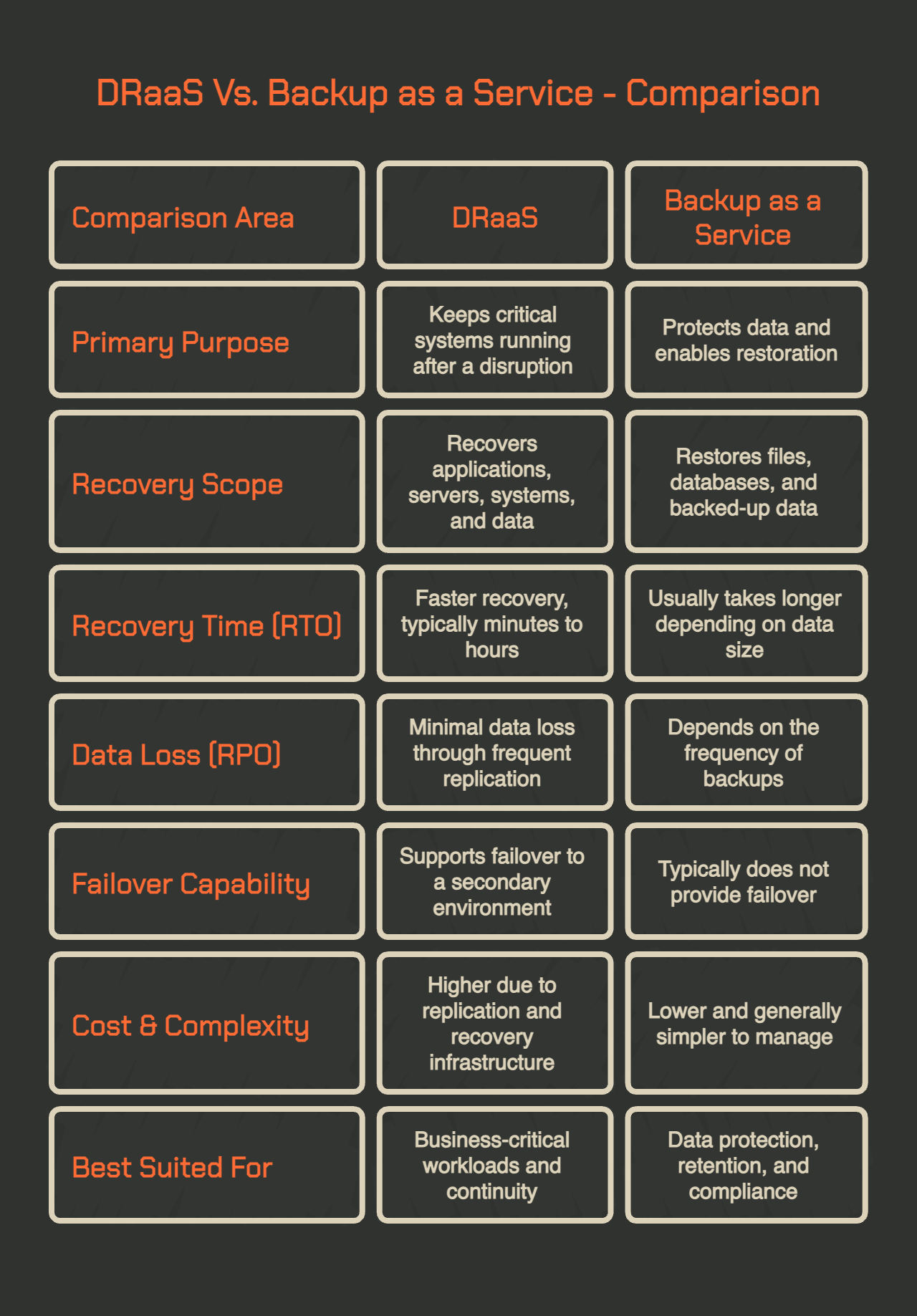
Backup as a Service (BaaS) copies your data to a remote location at defined intervals. If something goes wrong, you retrieve that data and restore it to functional infrastructure. The data is protected; the recovery process is largely manual and time-consuming.
A DRaaS solution goes further.
It replicates your full system state, including operating system configurations, application data, and network settings, to a secondary environment that can be activated rapidly. Where BaaS might return your data within hours, a cloud DRaaS platform is designed to have your systems operational within minutes.
These are complementary tools, not competing ones. BaaS protects what you cannot afford to lose; DRaaS protects how long you can afford to be down.
Replication, Failover, and Failback: The Three Stages of a DRaaS Plan
A properly designed DRaaS plan operates across three distinct phases, and most vendor conversations spend the majority of their time on the first two.
- Replication is the ongoing process of copying system state and data from your primary environment to the recovery site. The frequency and method of that replication determine how current your recovery environment is at the moment of failure.
- Failover is the activation of the recovery environment. In a managed DRaaS model, the provider executes the failover process on your behalf, redirecting traffic, spinning up replicated workloads, and keeping your users connected to a functional environment.
- Failback, the process of returning to your primary environment once it is restored, is the phase vendors consistently underemphasise and buyers frequently discover too late.
Failback is operationally complex. It requires reversing replication, validating data integrity, and returning production traffic to the primary site without data loss. In many platforms, failback is handled per workload rather than as a single operation, and it carries its own recovery timeline that is rarely specified in an SLA.
How DRaaS Works: Breaking Down the Process
DRaaS operates on a cycle of continuous or periodic replication feeding into an on-demand failover capability. The architecture underneath that cycle varies significantly by provider and replication method, and those differences have direct consequences for how fast you can recover and how much data you stand to lose when it matters most.
1. Snapshot-Based Replication Vs. Continuous Data Protection
Most DRaaS deployments use one of two replication approaches: snapshot-based or continuous data protection (CDP).
Snapshot-based replication captures the state of your systems at defined intervals, typically every 15 minutes to several hours, and sends those snapshots to the recovery environment. It is cost-effective and well-suited for workloads where some data loss is acceptable. If a failure occurs between snapshots, everything that changed since the last capture is gone.
Continuous Data Protection operates at the hypervisor level and replicates changes in near real-time, achieving Recovery Point Objectives measured in seconds rather than minutes or hours.
For regulated industries where any data loss creates compliance exposure, CDP is the more appropriate architecture.
The trade-off is obvious. CDP requires more bandwidth and generates higher infrastructure spend than snapshot-based approaches, but for Tier 1 workloads, the protection it delivers is categorically different.
2. RPO and RTO: What the Numbers Mean in Practice
RPO (Recovery Point Objective) is the maximum amount of data loss, measured in time, that your organisation can tolerate. An RPO of four hours means your DRaaS solution needs a recovery point captured no older than four hours ago. If a failure occurs, you may lose up to four hours of transactions.
RTO (Recovery Time Objective) is the maximum time your systems can be offline before business consequences become unacceptable. An RTO of one hour means your provider needs your environment operational within 60 minutes of a declared failure.
These two numbers should drive every DRaaS procurement decision. They are not static across your environment. Critical workloads like payment processing, EHR systems, or trading platforms warrant much tighter RTOs and RPOs than file storage or archiving functions. Any DRaaS vendor quoting a single RTO and RPO for your entire environment without distinguishing between workload tiers is giving you a sales number, not an engineering one.
3. Managed, Assisted, and Self-Service: The Three DRaaS Models
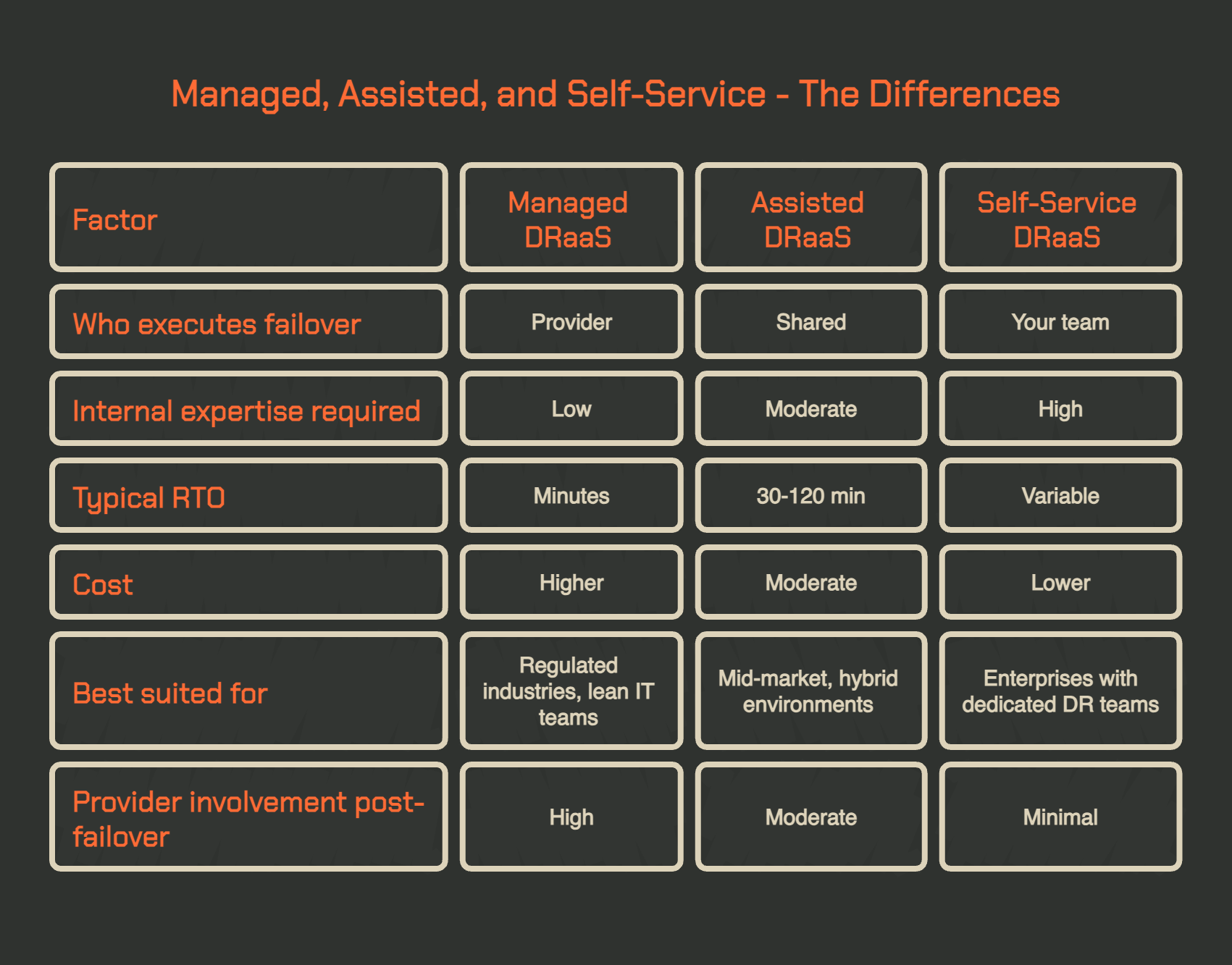
How much your team is involved in a recovery event depends directly on which DRaaS model you are purchasing. The right choice depends on your internal capabilities and, critically, on what state your IT team would be in at the moment a disaster is declared.
- Managed DRaaS: The provider handles the entire failover process. Your team declares the disaster; the provider executes the recovery plan. Best suited for organisations without deep in-house DR expertise, or those whose IT teams would be impacted by the same event causing the failure.
- Assisted DRaaS: Recovery is a shared effort. The provider offers guidance, infrastructure, and tooling; your team executes. Best for organisations with DR capability who want infrastructure support without full management overhead.
- Self-Service DRaaS: Your team runs the recovery using provider-supplied infrastructure and tooling. The provider maintains the recovery environment; your team owns the execution. Best for enterprises with dedicated DR capability and fully documented runbooks.
DRaaS and Ransomware: What Most Vendors Miss
Ransomware has become the most common trigger for disaster recovery declarations, and it introduces complications that standard DRaaS marketing rarely addresses. The Veeam 2025 Ransomware Trends Report found that 74% of organisations plan to use DRaaS specifically for ransomware recovery by 2026.
The demand is clearly there. The nuance around what that actually requires often is not.
When Continuous Replication Works Against You
In a ransomware scenario, continuous replication can accelerate the problem rather than contain it. If your DRaaS solution is replicating changes in near real-time and ransomware begins encrypting your primary environment, that encryption event may propagate to your recovery environment before anyone detects or contains the attack.
The practical consequence is that your stated RPO, the recovery point your SLA guarantees, may not give you a clean environment to recover from. Forensic investigation after ransomware incidents frequently reveals that attacker presence began days or even weeks before the encryption event. A recovery point from six hours ago may still carry the attacker's footprint, and restoring from it brings the threat back with it.
Immutable Snapshots and Clean-Room Recovery Environments
The answer to this problem is a combination of immutable storage and clean-room recovery. Immutable snapshots cannot be modified or deleted after they are written, which means ransomware cannot reach or corrupt them even with access to connected systems. A clean-room recovery environment is an isolated infrastructure instance with no connection to the production environment or the potentially compromised recovery site.
Where Your DR Data Lives Is Part of Your Recovery Strategy
Most DRaaS buyers focus on what the service does during a recovery event. Fewer ask where their replicated data actually lives between events. For Canadian organisations with compliance obligations, businesses really need to do their homework here.
If your DRaaS provider replicates your systems to a cloud region operated by a U.S.-headquartered company, that data is potentially subject to the U.S. Clarifying Lawful Overseas Use of Data (CLOUD) Act, which allows American law enforcement to compel access to data stored on U.S.-company-operated infrastructure regardless of physical location.
This applies even when the servers physically sit in Canada. The governing factor is which company operates the infrastructure, not where the hardware lives.
For organisations governed by Canada's Personal Information Protection and Electronic Documents Act (PIPEDA) or sector-specific frameworks like PHIPA or OSFI guidelines, a recovery environment that creates cross-border legal exposure is a compliance issue.
Regulated organisations should be asking their DRaaS vendors a direct question: can you confirm in writing that replication targets are operated exclusively under Canadian legal jurisdiction? If that answer is vague, your data sovereignty protections have a gap you may not discover until a recovery event makes it visible.
At Qu Data Centres, disaster recovery is not a premium feature layered on top of an infrastructure stack. It is part of what the stack is built to do. Qu's managed services platform integrates DRaaS through Zerto and Veeam directly alongside colocation, private cloud, and virtual private cloud environments, meaning replication, failover, and sovereignty are consistent properties of the same infrastructure rather than a separate product your team has to manage separately.
Recovery data stays in Canada, operated by Canadian staff, under Canadian law, across Tier III-certified facilities that carry SOC 1, SOC 2, and ISO 27001 certifications. The result is a cloud environment where business continuity is built into the foundation, not bolted on after the fact.
If your current recovery strategy was designed around infrastructure not built with sovereignty in mind, we can help. Book a tour to learn more today.
What to Ask Before Signing a DRaaS Contract
Most DRaaS evaluation processes focus on the technology stack. Fewer focus on the contract itself, which is where the actual commitments live. Before a DRaaS solution advances to procurement, there are specific questions that separate credible providers from those selling capability they cannot guarantee under real-world conditions.
SLA Clauses That Determine Your Real Recovery Window
The RTO in an SLA is only as meaningful as the consequences attached to missing it. Ask your provider what happens if they fail to meet the committed RTO. If the answer involves service credits that represent a fraction of your actual downtime cost, the SLA is built around their risk exposure, not yours.
Other SLA terms worth examining closely:
- Concurrent Recovery Capacity: If multiple clients declare a disaster simultaneously, what happens to your RTO? This is especially relevant during regional infrastructure failures that affect many customers at once.
- Failback Commitments: Is your return-to-primary timeline specified anywhere in the SLA? If not, your time operating out of the recovery environment is contractually unbounded.
- Workload Coverage Scope: Many DRaaS contracts protect servers and virtual machines but exclude application-layer dependencies like databases, licensing servers, or external API integrations. Confirm that a full recovery actually produces a working application, not just a running server.
DR Testing: The Indicator Most Buyers Overlook
An untested recovery plan is a hypothesis. Regulators in financial services and healthcare increasingly require documented evidence of tested recovery capability, not just a signed SLA from a DRaaS vendor.
A credible provider offers non-disruptive DR testing, meaning you can validate your recovery environment without impacting production operations. Ask how often testing is included in your contract and what it actually involves.
A tabletop exercise reviewing a runbook is categorically different from a live failover test that measures actual RTO performance against the contracted target. A practical cadence for regulated workloads is quarterly tabletop exercises, monthly instant recovery verifications, and at minimum an annual live failover execution. If a provider is reluctant to commit to that testing schedule in writing, that reluctance is itself a meaningful data point.
Why Qu Data Centres for Disaster Recovery
Most organisations treat disaster recovery as a capability they add once everything else is in place. At Qu, it is part of what everything else is built on. Recovery is not a separate product layer sitting above the infrastructure. It is a property of the infrastructure itself, the same Canadian facilities, the same sovereign operating model, the same certified environment that runs production workloads.
Qu operates nine purpose-built facilities across five Canadian markets: Toronto, Ottawa, Calgary, Edmonton, and London, Ontario. Colocation, private cloud, managed services, and disaster recovery all run within the same sovereign stack, meaning your production and recovery environments share the same legal jurisdiction, the same certifications, and the same 24/7 Canadian operations team. For regulated organisations, that consistency matters as much as the recovery speed itself.
If your team is building or re-evaluating your disaster recovery plan, book a tour of a Qu facility to see how the infrastructure is built to support recovery from the ground up.
Frequently Asked Questions About DRaaS
What Is DRaaS in Cloud Computing?
DRaaS is a cloud-delivered service in which a third-party provider replicates your IT environment to a secondary cloud infrastructure and manages failover if your primary systems go offline. It delivers enterprise-grade recovery capability without the capital investment of a dedicated secondary data centre, operating on a subscription model that converts DR into a predictable operating expense.
How Does DRaaS Ensure Business Continuity?
DRaaS ensures continuity by closing the gap between data protection and operational recovery. Rather than manually restoring from a backup after a failure, a DRaaS solution maintains a live-ready replica of your environment at all times. When a failure occurs, that replica activates with RTOs typically measured in minutes, keeping operations running without the extended downtime that manual restoration requires.
How Does DRaaS Reduce Recovery Costs?
DRaaS eliminates the capital cost of maintaining a dedicated secondary data centre. Rather than provisioning and staffing a standby environment, organisations pay a recurring fee covering infrastructure, management, and SLA-backed recovery commitments. The model converts a large fixed cost into a predictable operational expense while typically delivering faster recovery than most organisations can achieve with in-house infrastructure.
How Do I Protect On-Premise Servers with Cloud DRaaS?
Most DRaaS platforms support hybrid environments, replicating physical servers alongside virtual machines to a cloud recovery site. Tools like Veeam and Zerto support replication from on-premises infrastructure to cloud-hosted recovery environments, meaning a full virtualisation of your environment is not required before adopting DRaaS. A replication agent is installed on the source server and configured to target the provider's recovery infrastructure.
Is DRaaS the Same as Business Continuity?
DRaaS covers the IT infrastructure recovery layer, not the full scope of business continuity. Business continuity planning addresses how an organisation maintains operations across a broader range of disruptions, including supply chain issues, staffing crises, and extended outages. A mature continuity programme includes DRaaS for IT recovery alongside people, process, and communication plans for the wider organisation.
Sources Used for This Article
- ITIC: "ITIC 2024 Hourly Cost of Downtime Part 2" - itic-corp.com/itic-2024-hourly-cost-of-downtime-part-2/
- Veeam: "Understanding Disaster Recovery as a Service (DRaaS): Benefits, Use Cases, and Implementation Strategies" - veeam.com/blog/disaster-recovery-as-a-service-guide.html
- AWS: "Clarifying Lawful Overseas Use of Data (CLOUD) Act" - aws.amazon.com/compliance/cloud-act/
- Office of the Privacy Commissioner of Canada: "The Personal Information Protection and Electronic Documents Act (PIPEDA)" - priv.gc.ca/en/privacy-topics/privacy-laws-in-canada/the-personal-information-protection-and-electronic-documents-act-pipeda/



Quick Answer: DRaaS, or Disaster Recovery as a Service, is a managed cloud solution that continuously replicates your IT systems to a secondary environment and automates failover when your primary infrastructure fails. Unlike standard backup, which stores copies of your data, DRaaS keeps your actual applications operational with Recovery Time Objectives measured in minutes rather than hours or days. It is the difference between recovering your files and recovering your business.
Key Takeaways
When a disaster hits, "we have backups" and "we are back online" are two completely different things. For some organisations, getting back up online can take days.
In sectors like financial services, healthcare, and government, even a few hours of inaccessible systems triggers regulatory reporting obligations, breach notifications, and in some cases, direct financial penalties.
The problem most organisations run into is treating data protection and operational recovery as the same thing. A backup is a copy of your data. It is not a copy of your running environment. Getting from a backup file to a functional state requires provisioning infrastructure, restoring operating systems, reconfiguring applications, and validating dependencies across your entire workload stack. That process takes time that businesses under pressure simply cannot afford.
According to ITIC's 2024 Global Server Hardware and Server OS Reliability Survey, over 97% of large enterprises estimate a single hour of downtime costs more than $100,000, and 41% place that figure between $1 million and $5 million. DRaaS was designed to collapse that window.
What Is Disaster Recovery as a Service?
Disaster Recovery as a Service is a managed IT service in which a third-party provider continuously replicates your servers, applications, and data to a secondary cloud environment. When a failure occurs at the primary site, whether from a hardware fault, power outage, natural disaster, or cyberattack, that replicated environment activates and begins absorbing traffic automatically.
The distinction from other data protection tools is that DRaaS is not simply storing a copy of your data. It maintains a live-ready replica of your operational environment, including the compute, storage, networking, and application configurations required to actually run your workloads.
That difference matters enormously when recovery needs to happen in minutes.
DRaaS Vs. Backup as a Service: Not the Same Thing
Backup as a Service (BaaS) copies your data to a remote location at defined intervals. If something goes wrong, you retrieve that data and restore it to functional infrastructure. The data is protected; the recovery process is largely manual and time-consuming.
A DRaaS solution goes further.
It replicates your full system state, including operating system configurations, application data, and network settings, to a secondary environment that can be activated rapidly. Where BaaS might return your data within hours, a cloud DRaaS platform is designed to have your systems operational within minutes.
These are complementary tools, not competing ones. BaaS protects what you cannot afford to lose; DRaaS protects how long you can afford to be down.
Replication, Failover, and Failback: The Three Stages of a DRaaS Plan
A properly designed DRaaS plan operates across three distinct phases, and most vendor conversations spend the majority of their time on the first two.
Failback is operationally complex. It requires reversing replication, validating data integrity, and returning production traffic to the primary site without data loss. In many platforms, failback is handled per workload rather than as a single operation, and it carries its own recovery timeline that is rarely specified in an SLA.
How DRaaS Works: Breaking Down the Process
DRaaS operates on a cycle of continuous or periodic replication feeding into an on-demand failover capability. The architecture underneath that cycle varies significantly by provider and replication method, and those differences have direct consequences for how fast you can recover and how much data you stand to lose when it matters most.
1. Snapshot-Based Replication Vs. Continuous Data Protection
Most DRaaS deployments use one of two replication approaches: snapshot-based or continuous data protection (CDP).
Snapshot-based replication captures the state of your systems at defined intervals, typically every 15 minutes to several hours, and sends those snapshots to the recovery environment. It is cost-effective and well-suited for workloads where some data loss is acceptable. If a failure occurs between snapshots, everything that changed since the last capture is gone.
Continuous Data Protection operates at the hypervisor level and replicates changes in near real-time, achieving Recovery Point Objectives measured in seconds rather than minutes or hours.
For regulated industries where any data loss creates compliance exposure, CDP is the more appropriate architecture.
The trade-off is obvious. CDP requires more bandwidth and generates higher infrastructure spend than snapshot-based approaches, but for Tier 1 workloads, the protection it delivers is categorically different.
2. RPO and RTO: What the Numbers Mean in Practice
RPO (Recovery Point Objective) is the maximum amount of data loss, measured in time, that your organisation can tolerate. An RPO of four hours means your DRaaS solution needs a recovery point captured no older than four hours ago. If a failure occurs, you may lose up to four hours of transactions.
RTO (Recovery Time Objective) is the maximum time your systems can be offline before business consequences become unacceptable. An RTO of one hour means your provider needs your environment operational within 60 minutes of a declared failure.
These two numbers should drive every DRaaS procurement decision. They are not static across your environment. Critical workloads like payment processing, EHR systems, or trading platforms warrant much tighter RTOs and RPOs than file storage or archiving functions. Any DRaaS vendor quoting a single RTO and RPO for your entire environment without distinguishing between workload tiers is giving you a sales number, not an engineering one.
3. Managed, Assisted, and Self-Service: The Three DRaaS Models
How much your team is involved in a recovery event depends directly on which DRaaS model you are purchasing. The right choice depends on your internal capabilities and, critically, on what state your IT team would be in at the moment a disaster is declared.
DRaaS and Ransomware: What Most Vendors Miss
Ransomware has become the most common trigger for disaster recovery declarations, and it introduces complications that standard DRaaS marketing rarely addresses. The Veeam 2025 Ransomware Trends Report found that 74% of organisations plan to use DRaaS specifically for ransomware recovery by 2026.
The demand is clearly there. The nuance around what that actually requires often is not.
When Continuous Replication Works Against You
In a ransomware scenario, continuous replication can accelerate the problem rather than contain it. If your DRaaS solution is replicating changes in near real-time and ransomware begins encrypting your primary environment, that encryption event may propagate to your recovery environment before anyone detects or contains the attack.
The practical consequence is that your stated RPO, the recovery point your SLA guarantees, may not give you a clean environment to recover from. Forensic investigation after ransomware incidents frequently reveals that attacker presence began days or even weeks before the encryption event. A recovery point from six hours ago may still carry the attacker's footprint, and restoring from it brings the threat back with it.
Immutable Snapshots and Clean-Room Recovery Environments
The answer to this problem is a combination of immutable storage and clean-room recovery. Immutable snapshots cannot be modified or deleted after they are written, which means ransomware cannot reach or corrupt them even with access to connected systems. A clean-room recovery environment is an isolated infrastructure instance with no connection to the production environment or the potentially compromised recovery site.
Where Your DR Data Lives Is Part of Your Recovery Strategy
Most DRaaS buyers focus on what the service does during a recovery event. Fewer ask where their replicated data actually lives between events. For Canadian organisations with compliance obligations, businesses really need to do their homework here.
If your DRaaS provider replicates your systems to a cloud region operated by a U.S.-headquartered company, that data is potentially subject to the U.S. Clarifying Lawful Overseas Use of Data (CLOUD) Act, which allows American law enforcement to compel access to data stored on U.S.-company-operated infrastructure regardless of physical location.
This applies even when the servers physically sit in Canada. The governing factor is which company operates the infrastructure, not where the hardware lives.
For organisations governed by Canada's Personal Information Protection and Electronic Documents Act (PIPEDA) or sector-specific frameworks like PHIPA or OSFI guidelines, a recovery environment that creates cross-border legal exposure is a compliance issue.
Regulated organisations should be asking their DRaaS vendors a direct question: can you confirm in writing that replication targets are operated exclusively under Canadian legal jurisdiction? If that answer is vague, your data sovereignty protections have a gap you may not discover until a recovery event makes it visible.
At Qu Data Centres, disaster recovery is not a premium feature layered on top of an infrastructure stack. It is part of what the stack is built to do. Qu's managed services platform integrates DRaaS through Zerto and Veeam directly alongside colocation, private cloud, and virtual private cloud environments, meaning replication, failover, and sovereignty are consistent properties of the same infrastructure rather than a separate product your team has to manage separately.
Recovery data stays in Canada, operated by Canadian staff, under Canadian law, across Tier III-certified facilities that carry SOC 1, SOC 2, and ISO 27001 certifications. The result is a cloud environment where business continuity is built into the foundation, not bolted on after the fact.
If your current recovery strategy was designed around infrastructure not built with sovereignty in mind, we can help. Book a tour to learn more today.
What to Ask Before Signing a DRaaS Contract
Most DRaaS evaluation processes focus on the technology stack. Fewer focus on the contract itself, which is where the actual commitments live. Before a DRaaS solution advances to procurement, there are specific questions that separate credible providers from those selling capability they cannot guarantee under real-world conditions.
SLA Clauses That Determine Your Real Recovery Window
The RTO in an SLA is only as meaningful as the consequences attached to missing it. Ask your provider what happens if they fail to meet the committed RTO. If the answer involves service credits that represent a fraction of your actual downtime cost, the SLA is built around their risk exposure, not yours.
Other SLA terms worth examining closely:
DR Testing: The Indicator Most Buyers Overlook
An untested recovery plan is a hypothesis. Regulators in financial services and healthcare increasingly require documented evidence of tested recovery capability, not just a signed SLA from a DRaaS vendor.
A credible provider offers non-disruptive DR testing, meaning you can validate your recovery environment without impacting production operations. Ask how often testing is included in your contract and what it actually involves.
A tabletop exercise reviewing a runbook is categorically different from a live failover test that measures actual RTO performance against the contracted target. A practical cadence for regulated workloads is quarterly tabletop exercises, monthly instant recovery verifications, and at minimum an annual live failover execution. If a provider is reluctant to commit to that testing schedule in writing, that reluctance is itself a meaningful data point.
Why Qu Data Centres for Disaster Recovery
Most organisations treat disaster recovery as a capability they add once everything else is in place. At Qu, it is part of what everything else is built on. Recovery is not a separate product layer sitting above the infrastructure. It is a property of the infrastructure itself, the same Canadian facilities, the same sovereign operating model, the same certified environment that runs production workloads.
Qu operates nine purpose-built facilities across five Canadian markets: Toronto, Ottawa, Calgary, Edmonton, and London, Ontario. Colocation, private cloud, managed services, and disaster recovery all run within the same sovereign stack, meaning your production and recovery environments share the same legal jurisdiction, the same certifications, and the same 24/7 Canadian operations team. For regulated organisations, that consistency matters as much as the recovery speed itself.
If your team is building or re-evaluating your disaster recovery plan, book a tour of a Qu facility to see how the infrastructure is built to support recovery from the ground up.
Frequently Asked Questions About DRaaS
What Is DRaaS in Cloud Computing?
DRaaS is a cloud-delivered service in which a third-party provider replicates your IT environment to a secondary cloud infrastructure and manages failover if your primary systems go offline. It delivers enterprise-grade recovery capability without the capital investment of a dedicated secondary data centre, operating on a subscription model that converts DR into a predictable operating expense.
How Does DRaaS Ensure Business Continuity?
DRaaS ensures continuity by closing the gap between data protection and operational recovery. Rather than manually restoring from a backup after a failure, a DRaaS solution maintains a live-ready replica of your environment at all times. When a failure occurs, that replica activates with RTOs typically measured in minutes, keeping operations running without the extended downtime that manual restoration requires.
How Does DRaaS Reduce Recovery Costs?
DRaaS eliminates the capital cost of maintaining a dedicated secondary data centre. Rather than provisioning and staffing a standby environment, organisations pay a recurring fee covering infrastructure, management, and SLA-backed recovery commitments. The model converts a large fixed cost into a predictable operational expense while typically delivering faster recovery than most organisations can achieve with in-house infrastructure.
How Do I Protect On-Premise Servers with Cloud DRaaS?
Most DRaaS platforms support hybrid environments, replicating physical servers alongside virtual machines to a cloud recovery site. Tools like Veeam and Zerto support replication from on-premises infrastructure to cloud-hosted recovery environments, meaning a full virtualisation of your environment is not required before adopting DRaaS. A replication agent is installed on the source server and configured to target the provider's recovery infrastructure.
Is DRaaS the Same as Business Continuity?
DRaaS covers the IT infrastructure recovery layer, not the full scope of business continuity. Business continuity planning addresses how an organisation maintains operations across a broader range of disruptions, including supply chain issues, staffing crises, and extended outages. A mature continuity programme includes DRaaS for IT recovery alongside people, process, and communication plans for the wider organisation.
Sources Used for This Article
Paul M
Paul Miedzik is Senior Manager of Marketing at Qu Data Centres, with extensive experience in enterprise cloud and digital infrastructure across the Canadian tech sector.