Quick Answer: Air cooling is still the right choice for most enterprise racks, and liquid cooling becomes the more economical option once racks pass roughly 20 to 25 kW. Below that line, an air-cooled hall costs less to build, runs standard hardware and is easier to staff. Above it, direct liquid cooling removes heat that airflow can no longer carry, which is why most high-density facilities end up running a hybrid of both.
Key Takeaways
- Air cooling remains the better fit for most enterprise racks, while liquid cooling becomes more economical once density reaches roughly 20–25 kW per rack.
- Uptime Institute data cited in the article shows perimeter air cooling remains dominant, while direct liquid cooling adoption is still concentrated in denser environments.
- Direct-to-chip, immersion, and rear-door systems remove heat more efficiently at high densities, but they add piping, coolant, leak detection, and maintenance complexity.
- Liquid cooling can improve Power Usage Effectiveness and reduce fan energy, but actual savings depend on the entire cooling plant and heat-rejection design.
- Water use varies by architecture, so liquid cooling is not automatically more water-efficient than air cooling; dry coolers and evaporative towers produce different outcomes.
- Colocation buyers should verify committed rack density, facility water availability, cooling redundancy, air capacity, service terms, and retrofit constraints before choosing liquid-ready space.
- Book a tour to see how Qu Data Centres matches air-cooled, N+1 redundant infrastructure to enterprise workloads and identifies where denser designs need another approach.
Your next server refresh arrives with a spec sheet that looks nothing like the last one. A server processor rated at 120 to 150 W a decade ago now ships at up to 350 W, with roadmaps pointing to 500 to 600 W. A single refresh can bring servers that need 25% or more power and cooling than the units they replace, and most halls were never sized for that jump.
Then you have the conflicting advice. Vendors say liquid cooling is the only way forward, search results sing nothing but praises, and your facilities team warns that piping coolant into a live hall carries a risk nobody has priced. Meanwhile the racks in your own cage may still sit below 10 kW, a level where Uptime Institute reports that the typical rack remains comfortably served by air.
The honest answer depends on three things most comparisons skip: the density of the racks you will actually run, what your facility can physically support, and which parts of your hardware can accept liquid at all. Here’s what you need to know keeping Canadian climate specifically in mind.
What Is Data Centre Cooling and Why Does Rack Density Decide It?
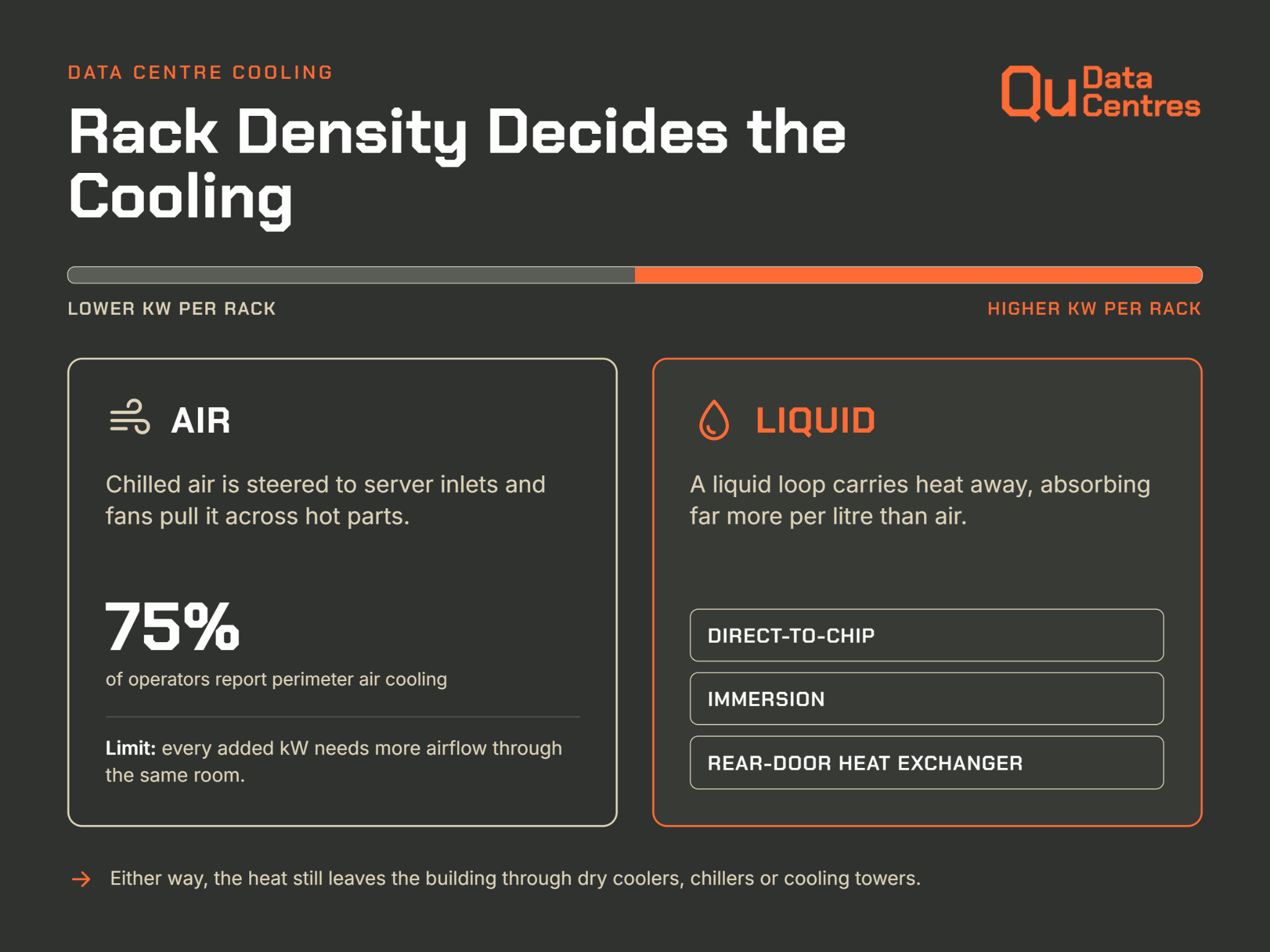
Cooling sets the ceiling on how much compute a room can hold, because every watt a server draws leaves the rack as heat that has to go somewhere. There are two options: pushing chilled air through the hall, or carrying heat away in a liquid loop. Rack density is the variable that decides which one you’re going to go with.
How Air Cooling Works in a Data Centre
Air cooling is the method most people picture.
Computer room air conditioning (CRAC) units or air handlers chill the air, raised floors and containment steer it to the server inlets, and fans inside each server pull it across the hot components. What many buyers call data centre air conditioning is really this loop plus the chillers or dry coolers outdoors that reject the heat. If you want to know more about this, we covered the mechanics in detail in our data center cooling piece.
Data centre air cooling is the more preferred option because it is simple and familiar. In Uptime Institute's 2025 Cooling Systems Survey, 75% of operators answering a question on IT cooling reported perimeter air cooling, against 22% for direct liquid cooling. Its limit is physics, since every added kilowatt per rack demands more airflow through the same floor tiles and the same server fans.
How a Data Centre Liquid Cooling System Works: Direct-To-Chip, Immersion and Rear-Door
A data centre liquid cooling system moves heat with a liquid instead of room air, because liquid absorbs far more heat per litre. ASHRAE's technical committee notes that liquid cooling is many times more effective at removing heat than air. Three designs cover most deployments:
- Direct-To-Chip: Cold plates sit on the CPUs and GPUs, and a coolant loop carries the heat to a coolant distribution unit.
- Immersion: Servers sit in a tank of dielectric fluid, and ASHRAE notes that tank designs often need a crane or two-person lift for servicing.
- Rear-Door Heat Exchangers: A liquid-cooled door on the rack captures exhaust heat before it enters the room.
Most liquid-cooled designs still reject their heat outdoors through dry coolers, chillers or cooling towers. The liquid changes how heat travels from the chip into the loop, and the facility still has to carry it the rest of the way.
Is Liquid Cooling Better Than Air Cooling? Key Differences in the Data Centre
Is liquid cooling better than air cooling? It depends on which line of the budget you read first. The six factors below are where the two methods truly diverge, and several of them contradict the claims on most comparison pages. Each one comes with the figure or constraint that changes the decision.
1. Heat Removal and Rack Density Limits
Air runs out of room before it runs out of cooling capacity. ASHRAE calculates that a 40 to 50 kW rack can need up to 5,000 cfm of airflow, while the best-performing raised-floor tile delivers about 1,900 cfm. Operators end up spreading equipment thin or adding supplemental cooling at the row.
Liquid removes the airflow constraint at the chip. Direct-to-chip plates and rear-door heat exchangers let a rack carry far more load in the same footprint, and ASHRAE notes that the top-placed supercomputers on the TOP500 list were all full or hybrid liquid-cooled, with racks in the tens to hundreds of kW.
2. Efficiency and Energy Savings Measured by PUE
PUE divides total facility power by IT power, so cooling overhead shows up directly in the number.
Lawrence Berkeley National Laboratory (LBNL) models the average U.S. PUE at 1.4 in 2023, down from 1.6 in 2014, and the same report shows infrastructure falling from 40% to 30% of total electricity. ASHRAE reports that liquid-cooled designs can reach a PUE below 1.1 when warm-water loops remove the need for chillers.
Part of the saving comes from inside the server. Fan power in dense air-cooled servers has climbed back to 10% to 20% of server power, which in a 50 kW rack means at least 5 kW spent on fans. Those figures are the strongest energy savings case for liquid, and they only appear when the facility runs warm water and retires mechanical cooling. A liquid loop attached to a chiller plant keeps most of the old overhead.
3. Water Consumption
Water is where the usual story flips.
LBNL estimates that U.S. data centres directly consumed about 66 billion litres of water in 2023, with hyperscale and colocation facilities making up 84% of it. Air-cooled chillers use almost no water on site but draw more electricity, while evaporative towers cut electricity and consume water. The report warns that low site water use is not automatically good, because the trade-off runs both ways.
Liquid cooling does not settle the question either. In LBNL's modelling, liquid-cooled IT paired with a waterside economizer and a water-cooled chiller still consumes substantial water, while the same IT served by dry coolers keeps water use minimal. The heat rejection method matters as much as the liquid at the rack. The mechanics are covered in more detail in how data centres use water.
4. Cost: Capex, Opex and Retrofit Reality
Cost depends on whether you are building new or retrofitting. ASHRAE finds that densification cuts electrical and network distribution costs, and that there is a rack density at which liquid cooling's first cost falls below air cooling for the same IT load.
Retrofits rarely have that benefit, which is one reason some organizations move dense gear into colocation space where the provider carries the plant. In Uptime Institute's 2025 survey, 38% of operators called liquid cooling too expensive, and 46% said ease of retrofit decides whether a system is viable.
A retrofit typically adds the following:
- Piping and Heat Exchangers: Facility water has to reach the row or the rack.
- Coolant Distribution Units: These sit between the facility loop and the server loop.
- Leak Protection: ASHRAE advises drip pans with leak detection under overhead pipes.
- Water Quality Control: Approved wetted materials and a clean-and-flush plan keep closed loops healthy.
5. Reliability, Leaks and Maintenance
Both methods fail, in different ways.
Uptime Institute's survey shows that 35% of operators have reliability concerns about liquid systems, and ASHRAE flags water quality as an ongoing worry because a closed loop's long-term success is often decided at design and installation.
Air cooling has a quiet failure mode of its own. LBNL notes that it is not uncommon to find multiple CRAC units in one room fighting each other, with some humidifying while others dehumidify, so real PUE rarely matches the design figure.
Staffing is the other half of reliability. Liquid adds procedures such as coolant checks and leak response that many air-cooled teams have never had to write, and Uptime lists staff training among the barriers to adoption.
6. Hardware and Warranty Compatibility
Not every component accepts liquid. Storage systems and networking equipment cannot currently be liquid-cooled in large parts of enterprise IT, so airflow never fully disappears. Standardization is the other gap, and it ranks as the top barrier at 39% because mixed coolant loops and vendor-specific parts raise lock-in fears.
|
Factor
|
Air cooling
|
Liquid cooling
|
|
Heat removal
|
Costs climb above roughly 20 to 25 kW per rack
|
Handles racks in the tens to hundreds of kW
|
|
Energy and PUE
|
Fan power can reach 10% to 20% of server power in dense servers
|
PUE below 1.1 is possible with warm-water loops and no chillers
|
|
Water
|
Waterless designs use more electricity, evaporative designs use more water
|
Depends on heat rejection, since dry coolers keep water low and towers do not
|
|
Cost
|
Lowest first cost at typical densities
|
Higher retrofit cost, with first cost dropping at high density
|
|
Reliability
|
Familiar failure modes, such as CRAC units fighting each other
|
Leak risk, water quality upkeep and new procedures
|
|
Hardware fit
|
Works with standard servers, storage and networking
|
Storage and networking often stay air-cooled, and immersion raises warranty questions
|
At What Rack Density Does Air Cooling Stop Working?
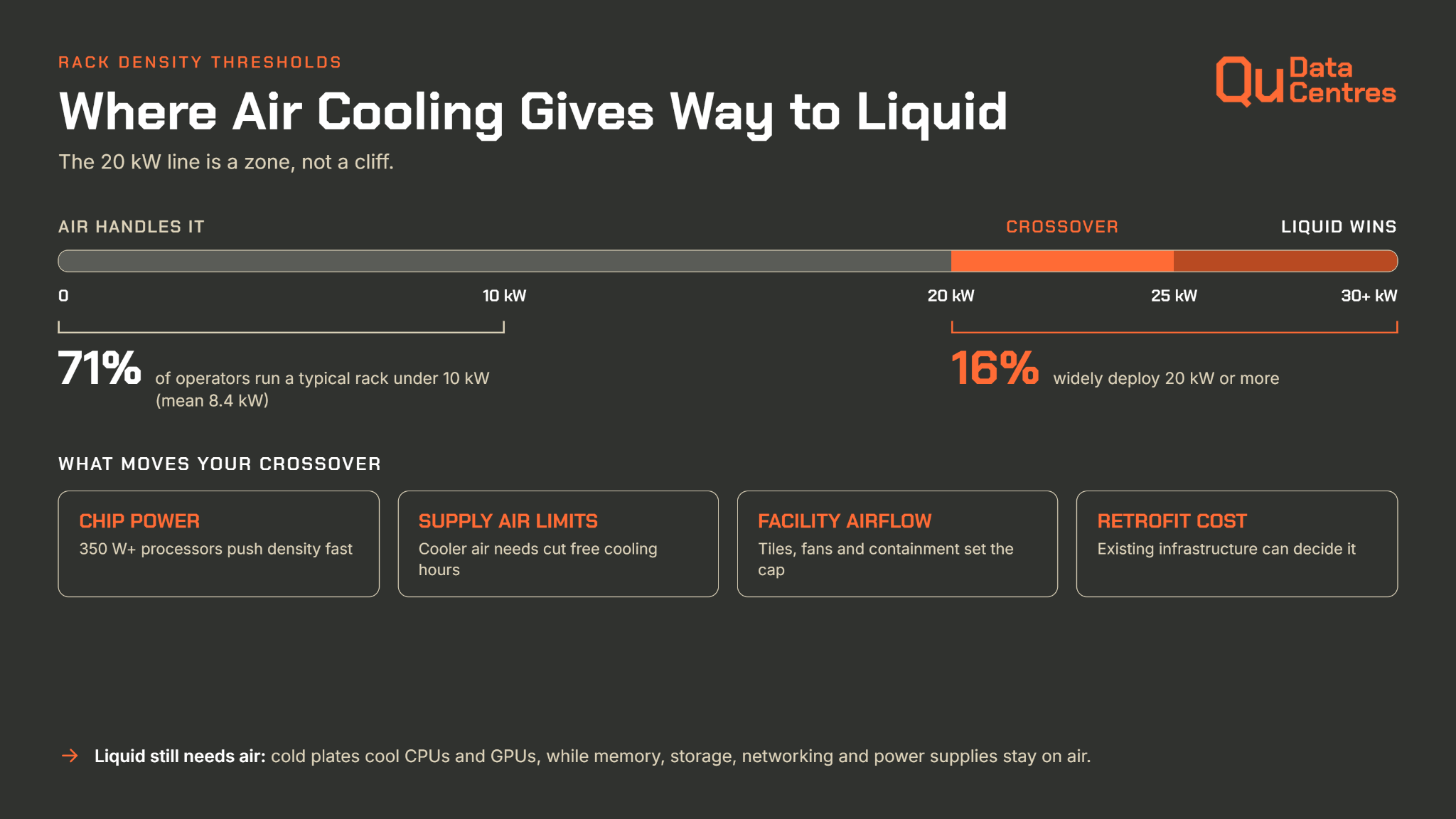
The 20 kW line is a zone more than a cliff. Air cooling gets steadily more expensive as density climbs, liquid cooling gets steadily cheaper by comparison, and the true crossover depends on your hardware and your building.
Why Most Enterprise Racks Still Run on Air
71% of operators reported a modal server rack density below 10 kW, with 5 to 9 kW the most common range and just 16% widely deploying 20 kW or more. The mean in that sample was 8.4 kW per rack. Later Uptime research still finds the typical rack under 10 kW, against a long-standing design assumption of 4 to 6 kW per rack.
Density is going up, but unevenly.
Most compute-intensive workloads sit in a small group of hyperscale facilities and reach most organizations as a service. That is why headline racks and typical racks look so different, and why a buyer sizing a standard enterprise deployment should start from their own numbers rather than from AI press releases.
The 20 to 25 kW Tipping Point
Uptime's analysis places the economic crossover at 20 to 25 kW per rack, where direct liquid cooling and precision air cooling both become more economical and efficient. Operators agree, since the 2025 survey reports that most believe direct liquid cooling becomes necessary above 20 kW, and that higher rack densities remain its top adoption driver. The exact crossover for your hall moves with four factors:
- Chip Power: Processors rated at 350 W and above lift rack density faster than rack counts suggest.
- Supply Air Limits: ASHRAE's H1 class asks for a recommended supply of 18 to 22°C for dense air-cooled gear, which cuts free cooling hours.
- Facility Airflow: Floor tiles, fans and containment cap how much air the room can deliver.
- Retrofit Cost: Existing infrastructure often decides whether liquid is viable at all.
Hybrid Cooling: Why Liquid Still Needs Air
Direct-to-chip cold plates capture heat from processors and accelerators, not from memory, storage, networking or power supplies. The Frontera supercomputer is a working example, where the CPUs are liquid-cooled and the rest of the system is air-cooled through a rear-door heat exchanger.
Hybrid designs carry their own penalty. ASHRAE warns that cooling the CPU with liquid while memory stays on air keeps fan power high and erodes the total cost of ownership benefit, because cold plates add airflow resistance. A liquid-cooled rack still draws on the room's air handling capacity, so the hall has to be designed for both loops.
Liquid Cooling in Colocation: What Tenants Can and Cannot Control
In a colocation hall, the cooling decision is shared. The provider owns the plant, the piping and the service agreement, while you own the servers, so your preferred technology only works if the building can carry it. That makes facility readiness a bigger question than the choice between cold plates and immersion.
Facility Cooling Vs Rack-Level Cooling
Two systems share the work in any hall. The facility plant, meaning chillers, dry coolers, towers and the water loops feeding the room, belongs to the provider. The rack-level system, meaning rear doors, cold plates and in-rack heat exchangers, is what the tenant's hardware connects to.
Colocation contracts have historically blocked that connection. Service agreements in colocation facilities may exclude water close to the racks, which leaves CRAC and CRAH cooling as the only option and takes row and door cooling off the table.
Liquid-to-air heat exchangers in the rack can bridge the gap, but they are less efficient than rejecting heat straight to facility water. It also recommends that any future data centre be designed with the capability to add liquid cooling.
Questions to Ask a Colocation Provider About Liquid Readiness
A provider's answers reveal readiness faster than a brochure does. Before signing for dense racks, ask these questions:
- What density per rack is the contract and the cooling plant designed for, and is that capacity committed or only rated?
- Is facility water available at the rack, or only room air?
- What redundancy backs the cooling plant, and is the design independently certified?
- How much of the room's cooling capacity will your racks consume at full load? ASHRAE warns that dense liquid-cooled racks can quickly use up remaining air handler capacity.
- What does the service agreement say about coolant, leaks and liability?
These questions slot straight into an AI-ready colocation RFP, where cooling sits alongside power and connectivity requirements.
How the Climate Changes the Data Centre Cooling Decision in Canada
Canada's weather gives operators an advantage no cooling vendor can sell: for much of the year, the air outside is cold enough to do the cooling work for free. How much that is worth depends on rack density, on the city, and on whether the cooling plant was built to take advantage of it.
Free Cooling Hours and Why Cold Air Favours Air Cooling at Moderate Density
Free cooling means rejecting heat with outdoor air or dry coolers instead of running compressors, and the savings are largest where winters are long. Statistics Canada's climate normals for 1971 to 2000 put the average annual temperature at 4.1°C in Calgary and 2.4°C in Edmonton, against 6.0°C in Ottawa and 7.5°C in Toronto.
Those averages are dated, but they show why chillers can sit idle for a large part of the year in the Prairies, and why Ontario sites still get a long winter window.
At moderate density the benefit is straightforward. A hall running 5 to 15 kW racks can lean on outdoor air for much of the year, because the supply temperature servers accept is far above a Canadian winter day.
Cooling then costs mostly fan power, and PUE improves as a result. It is also one reason Canada keeps showing up in the conversation about where AI and compute capacity is heading.
How Cold Weather Affects Liquid Cooling, Water Use and Heat Reuse
Climate helps liquid cooling too. Liquid loops can run on warmer water, so dry coolers can reject heat to outdoor air for most of the year without chillers or evaporative towers, which keeps both energy and water use low.
Drier regions add a wrinkle, since Calgary averages about 413 mm of precipitation a year against 944 mm in Ottawa. Dry air gives evaporative systems more headroom, but it also makes water supply a bigger question, a trade-off covered in how data centres use water.
Cold weather brings its own design work. Outdoor loops need freeze protection, usually glycol, and dry winter air means the hall has to be humidified to limit static risk. Canadian winters also create demand for heat, so the warmer return from a liquid loop can feed building heating, an option that is much harder with air-cooled halls.
How Qu Data Centres Helps You Match Cooling to Your Workload
A cooling strategy is only as good as the facility behind it. Qu Data Centres is a Canadian-owned, carrier-neutral colocation provider with nine facilities across Calgary, Edmonton, Ottawa, Toronto and London, Ontario, and four of them are Uptime Institute Tier III certified. That footprint lets you place each workload where the power, cooling and connectivity fit, keep data on Canadian soil, and spread risk across sites for disaster recovery.
Qu's plants are air-cooled with N+1 redundancy, built for the densities most enterprise and inference workloads run today. If your roadmap goes beyond that range, the team will tell you plainly what fits now and what needs a different design.
Racks that outgrow those ranges deserve a conversation early, before hardware is ordered. Book a tour to learn more today.
Frequently Asked Questions About Data Centre Liquid Cooling Vs Air Cooling
Is Liquid Cooling Better Than Air Cooling for Data Centres?
Neither wins everywhere. Liquid cooling is better for very dense racks, such as GPU clusters, because it removes heat that airflow cannot carry. Air cooling is better for typical enterprise racks, since it costs less to build, works with standard hardware and is simpler to run. Most dense facilities end up using both.
At What Rack Density Is Liquid Cooling Necessary?
Most operators treat 20 to 25 kW per rack as the point where air cooling becomes costly or inefficient and direct liquid cooling becomes more economical. Below 10 kW, which covers most enterprise racks, air cooling is usually the simpler and cheaper choice. The exact threshold depends on your hardware, airflow and facility design.
Can an Existing Data Centre Be Retrofitted for Liquid Cooling?
Yes, but cost and effort vary widely. A retrofit usually needs piping, coolant distribution units, leak detection and water quality controls. Rear-door heat exchangers and in-rack liquid-to-air units are the easiest starting points because they need less facility change. Floor loading, power distribution and available space can also limit how far an older hall can go.
What Is the Difference Between Direct-To-Chip and Immersion Cooling?
Direct-to-chip cooling places cold plates on processors and GPUs, with coolant circulating through them while the rest of the server stays air-cooled. Immersion cooling submerges the whole server in dielectric fluid. Direct-to-chip fits standard racks more easily, while immersion captures more heat but complicates servicing and can raise hardware warranty questions.
Is Liquid Cooling Safe for Servers?
It is when designed and maintained properly. Closed-loop systems use sealed connections, leak detection and drip protection, and the dielectric fluids used in immersion do not conduct electricity. The main risks are leaks, poor water quality and untrained staff. Operators should check hardware warranty terms and follow the server manufacturer's coolant requirements.
How Much Energy Can Liquid Cooling Save in a Data Centre?
Energy savings depend on the whole system. Liquid cooling cuts server fan power and allows warmer water, which reduces or removes chiller use. Facilities that keep a traditional chiller plant capture less of the benefit. Operators should compare PUE and water use before and after a change, not fan power alone.
Sources Used for This Article
- Uptime Institute Journal: "Too hot to handle: Operators to struggle with new chips" - journal.uptimeinstitute.com/too-hot-to-handle-operators-to-struggle-with-new-chips/
- ASHRAE: "Emergence and Expansion of Liquid Cooling in Mainstream Data Centers" - ashrae.org/File%20Library/Technical%20Resources/Bookstore/Emergence-and-Expansion-of-Liquid-Cooling-in-Mainstream-Data-Centers_WP.pdf
- Uptime Intelligence: "2025 Cooling Systems Survey [Results and Crosstab files]" - intelligence.uptimeinstitute.com/resource/2025-cooling-systems-survey-results-and-crosstab-files
- MIT Climate Portal / Lawrence Berkeley National Laboratory: "2024 United States Data Center Energy Usage Report" - climate.mit.edu/sites/default/files/2025-02/lbnl-2024-united-states-data-center-energy-usage-report.pdf
- Uptime Institute Journal: "Rack density is rising" - journal.uptimeinstitute.com/rack-density-is-rising/






Quick Answer: Air cooling is still the right choice for most enterprise racks, and liquid cooling becomes the more economical option once racks pass roughly 20 to 25 kW. Below that line, an air-cooled hall costs less to build, runs standard hardware and is easier to staff. Above it, direct liquid cooling removes heat that airflow can no longer carry, which is why most high-density facilities end up running a hybrid of both.
Key Takeaways
Your next server refresh arrives with a spec sheet that looks nothing like the last one. A server processor rated at 120 to 150 W a decade ago now ships at up to 350 W, with roadmaps pointing to 500 to 600 W. A single refresh can bring servers that need 25% or more power and cooling than the units they replace, and most halls were never sized for that jump.
Then you have the conflicting advice. Vendors say liquid cooling is the only way forward, search results sing nothing but praises, and your facilities team warns that piping coolant into a live hall carries a risk nobody has priced. Meanwhile the racks in your own cage may still sit below 10 kW, a level where Uptime Institute reports that the typical rack remains comfortably served by air.
The honest answer depends on three things most comparisons skip: the density of the racks you will actually run, what your facility can physically support, and which parts of your hardware can accept liquid at all. Here’s what you need to know keeping Canadian climate specifically in mind.
What Is Data Centre Cooling and Why Does Rack Density Decide It?
Cooling sets the ceiling on how much compute a room can hold, because every watt a server draws leaves the rack as heat that has to go somewhere. There are two options: pushing chilled air through the hall, or carrying heat away in a liquid loop. Rack density is the variable that decides which one you’re going to go with.
How Air Cooling Works in a Data Centre
Air cooling is the method most people picture.
Computer room air conditioning (CRAC) units or air handlers chill the air, raised floors and containment steer it to the server inlets, and fans inside each server pull it across the hot components. What many buyers call data centre air conditioning is really this loop plus the chillers or dry coolers outdoors that reject the heat. If you want to know more about this, we covered the mechanics in detail in our data center cooling piece.
Data centre air cooling is the more preferred option because it is simple and familiar. In Uptime Institute's 2025 Cooling Systems Survey, 75% of operators answering a question on IT cooling reported perimeter air cooling, against 22% for direct liquid cooling. Its limit is physics, since every added kilowatt per rack demands more airflow through the same floor tiles and the same server fans.
How a Data Centre Liquid Cooling System Works: Direct-To-Chip, Immersion and Rear-Door
A data centre liquid cooling system moves heat with a liquid instead of room air, because liquid absorbs far more heat per litre. ASHRAE's technical committee notes that liquid cooling is many times more effective at removing heat than air. Three designs cover most deployments:
Most liquid-cooled designs still reject their heat outdoors through dry coolers, chillers or cooling towers. The liquid changes how heat travels from the chip into the loop, and the facility still has to carry it the rest of the way.
Is Liquid Cooling Better Than Air Cooling? Key Differences in the Data Centre
Is liquid cooling better than air cooling? It depends on which line of the budget you read first. The six factors below are where the two methods truly diverge, and several of them contradict the claims on most comparison pages. Each one comes with the figure or constraint that changes the decision.
1. Heat Removal and Rack Density Limits
Air runs out of room before it runs out of cooling capacity. ASHRAE calculates that a 40 to 50 kW rack can need up to 5,000 cfm of airflow, while the best-performing raised-floor tile delivers about 1,900 cfm. Operators end up spreading equipment thin or adding supplemental cooling at the row.
Liquid removes the airflow constraint at the chip. Direct-to-chip plates and rear-door heat exchangers let a rack carry far more load in the same footprint, and ASHRAE notes that the top-placed supercomputers on the TOP500 list were all full or hybrid liquid-cooled, with racks in the tens to hundreds of kW.
2. Efficiency and Energy Savings Measured by PUE
PUE divides total facility power by IT power, so cooling overhead shows up directly in the number.
Lawrence Berkeley National Laboratory (LBNL) models the average U.S. PUE at 1.4 in 2023, down from 1.6 in 2014, and the same report shows infrastructure falling from 40% to 30% of total electricity. ASHRAE reports that liquid-cooled designs can reach a PUE below 1.1 when warm-water loops remove the need for chillers.
Part of the saving comes from inside the server. Fan power in dense air-cooled servers has climbed back to 10% to 20% of server power, which in a 50 kW rack means at least 5 kW spent on fans. Those figures are the strongest energy savings case for liquid, and they only appear when the facility runs warm water and retires mechanical cooling. A liquid loop attached to a chiller plant keeps most of the old overhead.
3. Water Consumption
Water is where the usual story flips.
LBNL estimates that U.S. data centres directly consumed about 66 billion litres of water in 2023, with hyperscale and colocation facilities making up 84% of it. Air-cooled chillers use almost no water on site but draw more electricity, while evaporative towers cut electricity and consume water. The report warns that low site water use is not automatically good, because the trade-off runs both ways.
Liquid cooling does not settle the question either. In LBNL's modelling, liquid-cooled IT paired with a waterside economizer and a water-cooled chiller still consumes substantial water, while the same IT served by dry coolers keeps water use minimal. The heat rejection method matters as much as the liquid at the rack. The mechanics are covered in more detail in how data centres use water.
4. Cost: Capex, Opex and Retrofit Reality
Cost depends on whether you are building new or retrofitting. ASHRAE finds that densification cuts electrical and network distribution costs, and that there is a rack density at which liquid cooling's first cost falls below air cooling for the same IT load.
Retrofits rarely have that benefit, which is one reason some organizations move dense gear into colocation space where the provider carries the plant. In Uptime Institute's 2025 survey, 38% of operators called liquid cooling too expensive, and 46% said ease of retrofit decides whether a system is viable.
A retrofit typically adds the following:
5. Reliability, Leaks and Maintenance
Both methods fail, in different ways.
Uptime Institute's survey shows that 35% of operators have reliability concerns about liquid systems, and ASHRAE flags water quality as an ongoing worry because a closed loop's long-term success is often decided at design and installation.
Air cooling has a quiet failure mode of its own. LBNL notes that it is not uncommon to find multiple CRAC units in one room fighting each other, with some humidifying while others dehumidify, so real PUE rarely matches the design figure.
Staffing is the other half of reliability. Liquid adds procedures such as coolant checks and leak response that many air-cooled teams have never had to write, and Uptime lists staff training among the barriers to adoption.
6. Hardware and Warranty Compatibility
Not every component accepts liquid. Storage systems and networking equipment cannot currently be liquid-cooled in large parts of enterprise IT, so airflow never fully disappears. Standardization is the other gap, and it ranks as the top barrier at 39% because mixed coolant loops and vendor-specific parts raise lock-in fears.
Factor
Air cooling
Liquid cooling
Heat removal
Costs climb above roughly 20 to 25 kW per rack
Handles racks in the tens to hundreds of kW
Energy and PUE
Fan power can reach 10% to 20% of server power in dense servers
PUE below 1.1 is possible with warm-water loops and no chillers
Water
Waterless designs use more electricity, evaporative designs use more water
Depends on heat rejection, since dry coolers keep water low and towers do not
Cost
Lowest first cost at typical densities
Higher retrofit cost, with first cost dropping at high density
Reliability
Familiar failure modes, such as CRAC units fighting each other
Leak risk, water quality upkeep and new procedures
Hardware fit
Works with standard servers, storage and networking
Storage and networking often stay air-cooled, and immersion raises warranty questions
At What Rack Density Does Air Cooling Stop Working?
The 20 kW line is a zone more than a cliff. Air cooling gets steadily more expensive as density climbs, liquid cooling gets steadily cheaper by comparison, and the true crossover depends on your hardware and your building.
Why Most Enterprise Racks Still Run on Air
71% of operators reported a modal server rack density below 10 kW, with 5 to 9 kW the most common range and just 16% widely deploying 20 kW or more. The mean in that sample was 8.4 kW per rack. Later Uptime research still finds the typical rack under 10 kW, against a long-standing design assumption of 4 to 6 kW per rack.
Density is going up, but unevenly.
Most compute-intensive workloads sit in a small group of hyperscale facilities and reach most organizations as a service. That is why headline racks and typical racks look so different, and why a buyer sizing a standard enterprise deployment should start from their own numbers rather than from AI press releases.
The 20 to 25 kW Tipping Point
Uptime's analysis places the economic crossover at 20 to 25 kW per rack, where direct liquid cooling and precision air cooling both become more economical and efficient. Operators agree, since the 2025 survey reports that most believe direct liquid cooling becomes necessary above 20 kW, and that higher rack densities remain its top adoption driver. The exact crossover for your hall moves with four factors:
Hybrid Cooling: Why Liquid Still Needs Air
Direct-to-chip cold plates capture heat from processors and accelerators, not from memory, storage, networking or power supplies. The Frontera supercomputer is a working example, where the CPUs are liquid-cooled and the rest of the system is air-cooled through a rear-door heat exchanger.
Hybrid designs carry their own penalty. ASHRAE warns that cooling the CPU with liquid while memory stays on air keeps fan power high and erodes the total cost of ownership benefit, because cold plates add airflow resistance. A liquid-cooled rack still draws on the room's air handling capacity, so the hall has to be designed for both loops.
Liquid Cooling in Colocation: What Tenants Can and Cannot Control
In a colocation hall, the cooling decision is shared. The provider owns the plant, the piping and the service agreement, while you own the servers, so your preferred technology only works if the building can carry it. That makes facility readiness a bigger question than the choice between cold plates and immersion.
Facility Cooling Vs Rack-Level Cooling
Two systems share the work in any hall. The facility plant, meaning chillers, dry coolers, towers and the water loops feeding the room, belongs to the provider. The rack-level system, meaning rear doors, cold plates and in-rack heat exchangers, is what the tenant's hardware connects to.
Colocation contracts have historically blocked that connection. Service agreements in colocation facilities may exclude water close to the racks, which leaves CRAC and CRAH cooling as the only option and takes row and door cooling off the table.
Liquid-to-air heat exchangers in the rack can bridge the gap, but they are less efficient than rejecting heat straight to facility water. It also recommends that any future data centre be designed with the capability to add liquid cooling.
Questions to Ask a Colocation Provider About Liquid Readiness
A provider's answers reveal readiness faster than a brochure does. Before signing for dense racks, ask these questions:
These questions slot straight into an AI-ready colocation RFP, where cooling sits alongside power and connectivity requirements.
How the Climate Changes the Data Centre Cooling Decision in Canada
Canada's weather gives operators an advantage no cooling vendor can sell: for much of the year, the air outside is cold enough to do the cooling work for free. How much that is worth depends on rack density, on the city, and on whether the cooling plant was built to take advantage of it.
Free Cooling Hours and Why Cold Air Favours Air Cooling at Moderate Density
Free cooling means rejecting heat with outdoor air or dry coolers instead of running compressors, and the savings are largest where winters are long. Statistics Canada's climate normals for 1971 to 2000 put the average annual temperature at 4.1°C in Calgary and 2.4°C in Edmonton, against 6.0°C in Ottawa and 7.5°C in Toronto.
Those averages are dated, but they show why chillers can sit idle for a large part of the year in the Prairies, and why Ontario sites still get a long winter window.
At moderate density the benefit is straightforward. A hall running 5 to 15 kW racks can lean on outdoor air for much of the year, because the supply temperature servers accept is far above a Canadian winter day.
Cooling then costs mostly fan power, and PUE improves as a result. It is also one reason Canada keeps showing up in the conversation about where AI and compute capacity is heading.
How Cold Weather Affects Liquid Cooling, Water Use and Heat Reuse
Climate helps liquid cooling too. Liquid loops can run on warmer water, so dry coolers can reject heat to outdoor air for most of the year without chillers or evaporative towers, which keeps both energy and water use low.
Drier regions add a wrinkle, since Calgary averages about 413 mm of precipitation a year against 944 mm in Ottawa. Dry air gives evaporative systems more headroom, but it also makes water supply a bigger question, a trade-off covered in how data centres use water.
Cold weather brings its own design work. Outdoor loops need freeze protection, usually glycol, and dry winter air means the hall has to be humidified to limit static risk. Canadian winters also create demand for heat, so the warmer return from a liquid loop can feed building heating, an option that is much harder with air-cooled halls.
How Qu Data Centres Helps You Match Cooling to Your Workload
A cooling strategy is only as good as the facility behind it. Qu Data Centres is a Canadian-owned, carrier-neutral colocation provider with nine facilities across Calgary, Edmonton, Ottawa, Toronto and London, Ontario, and four of them are Uptime Institute Tier III certified. That footprint lets you place each workload where the power, cooling and connectivity fit, keep data on Canadian soil, and spread risk across sites for disaster recovery.
Qu's plants are air-cooled with N+1 redundancy, built for the densities most enterprise and inference workloads run today. If your roadmap goes beyond that range, the team will tell you plainly what fits now and what needs a different design.
Racks that outgrow those ranges deserve a conversation early, before hardware is ordered. Book a tour to learn more today.
Frequently Asked Questions About Data Centre Liquid Cooling Vs Air Cooling
Is Liquid Cooling Better Than Air Cooling for Data Centres?
Neither wins everywhere. Liquid cooling is better for very dense racks, such as GPU clusters, because it removes heat that airflow cannot carry. Air cooling is better for typical enterprise racks, since it costs less to build, works with standard hardware and is simpler to run. Most dense facilities end up using both.
At What Rack Density Is Liquid Cooling Necessary?
Most operators treat 20 to 25 kW per rack as the point where air cooling becomes costly or inefficient and direct liquid cooling becomes more economical. Below 10 kW, which covers most enterprise racks, air cooling is usually the simpler and cheaper choice. The exact threshold depends on your hardware, airflow and facility design.
Can an Existing Data Centre Be Retrofitted for Liquid Cooling?
Yes, but cost and effort vary widely. A retrofit usually needs piping, coolant distribution units, leak detection and water quality controls. Rear-door heat exchangers and in-rack liquid-to-air units are the easiest starting points because they need less facility change. Floor loading, power distribution and available space can also limit how far an older hall can go.
What Is the Difference Between Direct-To-Chip and Immersion Cooling?
Direct-to-chip cooling places cold plates on processors and GPUs, with coolant circulating through them while the rest of the server stays air-cooled. Immersion cooling submerges the whole server in dielectric fluid. Direct-to-chip fits standard racks more easily, while immersion captures more heat but complicates servicing and can raise hardware warranty questions.
Is Liquid Cooling Safe for Servers?
It is when designed and maintained properly. Closed-loop systems use sealed connections, leak detection and drip protection, and the dielectric fluids used in immersion do not conduct electricity. The main risks are leaks, poor water quality and untrained staff. Operators should check hardware warranty terms and follow the server manufacturer's coolant requirements.
How Much Energy Can Liquid Cooling Save in a Data Centre?
Energy savings depend on the whole system. Liquid cooling cuts server fan power and allows warmer water, which reduces or removes chiller use. Facilities that keep a traditional chiller plant capture less of the benefit. Operators should compare PUE and water use before and after a change, not fan power alone.
Sources Used for This Article
Paul M
Paul Miedzik is Senior Manager of Marketing at Qu Data Centres, with extensive experience in enterprise cloud and digital infrastructure across the Canadian tech sector.