Quick Answer: Moving a GPU cluster from cloud to colocation means taking ownership of the physical hardware, the network fabric, and every operational layer the cloud provider was managing on your behalf. The process requires a structured audit of your cluster's performance baseline, power and cooling requirements, and interconnect architecture before any hardware ships. Done correctly, colocation can reduce total cost of ownership by 40-60% for sustained GPU workloads compared to cloud rates, while giving you full control over hardware selection and data handling.
Key Takeaways
- Moving GPU clusters from cloud to colocation requires owning the hardware, network fabric, operational stack, power planning, and migration process.
- Cloud providers abstract GPU networking, RDMA fabric, subnet management, checkpoint storage, and operational support that teams must rebuild in colocation.
- Colocation can reduce total cost of ownership by 40–60% for sustained GPU workloads once utilisation exceeds roughly 60% over three years.
- Teams should baseline cloud performance with NCCL Tests before migration, then validate colocation performance against all-reduce bandwidth and GPU utilisation.
- Critical pre-migration audits include rack power density, cooling architecture, floor load capacity, cable distance limits, and InfiniBand versus RoCEv2 selection.
- Migration should proceed through environment preparation, checkpointing, cutover validation, and full-scale acceptance testing before production traffic moves.
- Book a facility tour with Qu Data Centres and bring your power density and rack count requirements to confirm what your GPU deployment can support.
Most AI teams arrive at the cloud-to-colocation decision the same way. The monthly GPU bill climbs faster than model performance does, and at some point someone in finance flags the discrepancy. The maths is straightforward enough. The execution is not.
What those conversations rarely surface is how much of the cloud platform's value lives below the compute API. Your GPU-to-GPU interconnect, your RDMA fabric, your subnet management, your checkpoint storage configuration: all of it has been handled for you. Moving to colocation does not just mean finding a building to put your servers in. It means taking ownership of an infrastructure stack that most cloud users have never had to touch.
This guide is written for the infrastructure leads and engineering teams who have made the decision and need to execute it without incident, starting with the pieces most migration playbooks skip over entirely.
What a Cloud GPU Infrastructure Handles for You
Most teams underestimate how much work cloud providers absorb below the compute abstraction layer. The GPUs are visible and well-documented. The networking, power distribution, and operational support structures that make those GPUs useful at scale are largely invisible until you have to build them yourself.
When you run GPU workloads in the cloud, the interconnect fabric connecting your compute nodes is pre-built and managed by the provider. AWS uses Elastic Fabric Adapter (EFA), which provides RDMA-like performance over its internal network. Google Cloud provisions custom high-speed fabrics for GPU instances.
NVIDIA's Collective Communications Library (NCCL) detects and uses whatever fabric the cloud exposes, and your distributed training jobs communicate at high bandwidth without you configuring a single switch port or subnet route.
In colocation, that abstraction is completely absent. If your cluster runs InfiniBand, you need to deploy OpenSM as the subnet manager and validate that it is initialising and routing correctly before you add a single compute node.
If you opt for RoCEv2 instead, you need to configure Priority Flow Control and DCQCN congestion notification on every switch in the fabric to achieve lossless behaviour. The risk with RoCEv2 is well-documented: a misconfigured network will silently fall back to standard TCP, and your cluster will compute at a fraction of expected throughput with no obvious error to investigate.
The trade-off of managed networking is that you cannot tune it to your specific workload. Cloud providers choose fabric architectures that work across all tenants, not ones optimised for your particular training topology.
In colocation, rail-optimised InfiniBand architectures that align GPU pairs with NVLink domains are available and fully configurable. For clusters at scale, this is not a minor optimisation. Research on GPU cluster network topology design shows that network configuration errors account for roughly 10.7% of significant job failures in production GPU deployments, and topology choice directly influences how much of that risk you carry.
When the Cloud GPU Bill Stops Making Sense
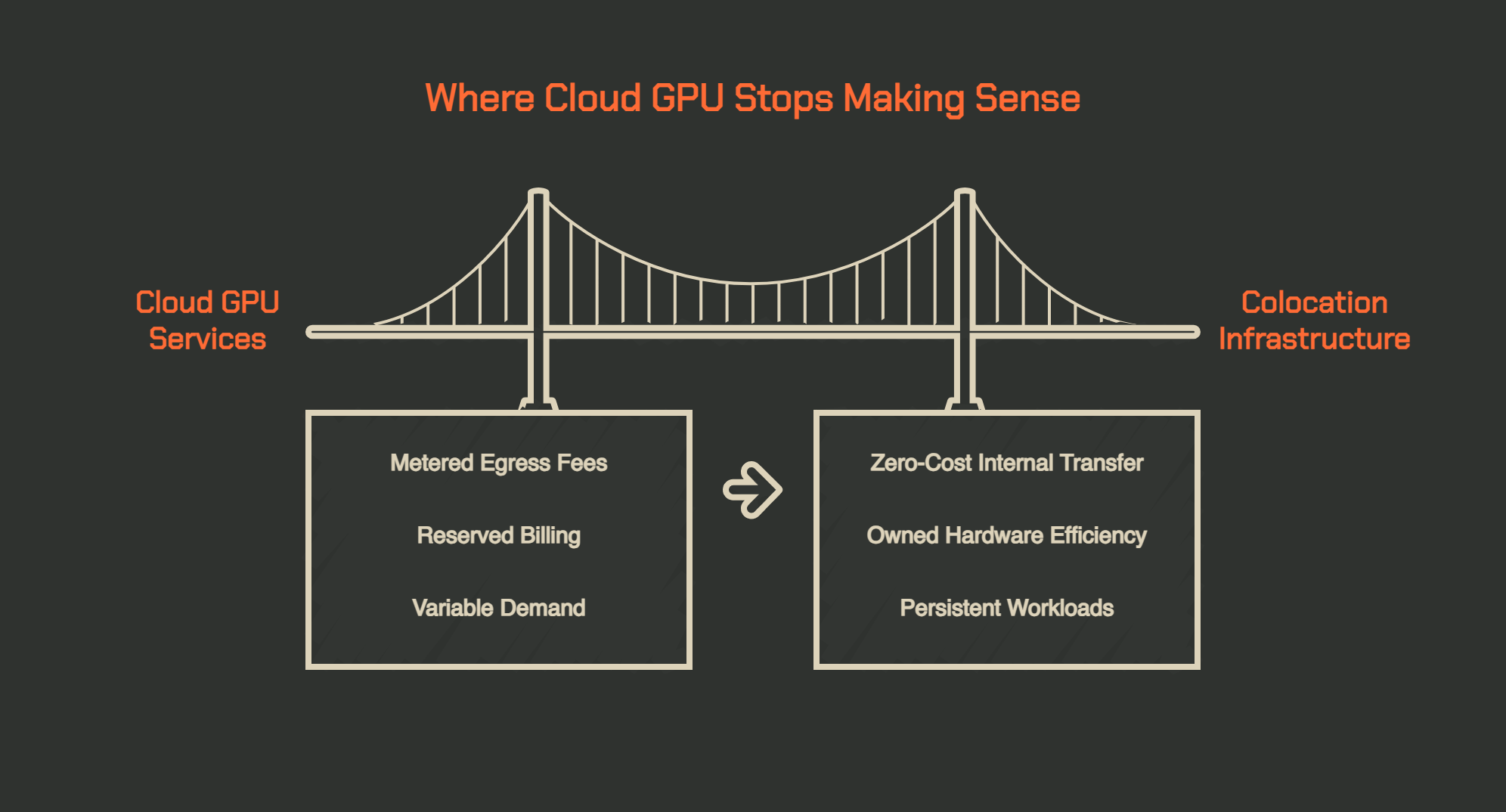
Cloud GPU pricing is not designed for teams running sustained, continuous workloads. It is designed for teams with variable demand who need infrastructure on short notice. For teams training models around the clock or running persistent inference pipelines, that flexibility premium compounds into a significant overpayment relative to owned hardware in a purpose-built facility.
Egress Fees and the AI Data Pipeline
The charge that catches most teams off-guard is not the GPU instance cost. It is data egress.
Moving training data from object storage into your compute environment, writing model checkpoints back out, and distributing inference outputs all generate outbound data transfer fees. AWS charges $0.09 per GB for the first 10TB of internet egress per month, and that baseline rate does not include NAT Gateway processing fees or cross-AZ transfer, which can push the effective per-GB cost to $0.135 or higher.
For teams moving petabyte-scale training datasets, egress alone can represent tens of thousands of dollars monthly. In colocation, that data moves within your own infrastructure at no per-byte cost.
The egress problem is especially visible in AI pipelines because the data volumes are large and the movement is continuous. Training data comes in. Checkpoints go out. Inference outputs move downstream. Each transfer is metered, and what looks like a manageable line item at small scale becomes a structural cost problem as model sizes grow.
Reserved Capacity Vs Actual Utilisation
Cloud GPU pricing for serious AI workloads is rarely truly on-demand. Teams commit to reserved instances to get predictable rates, and those reservations bill whether or not the GPUs are busy.
A 1,024-GPU H100 cluster on one-year reserved neocloud pricing runs roughly $13-18M annually, compared to $25-30M at standard hyperscaler on-demand rates. Owned hardware in colocation, at above 60% three-year utilisation, comes in substantially below either figure.
This is the calculation that has been driving the wave of cloud repatriation across enterprise AI teams. Once you can predict that your cluster will run above 60% utilisation over a three-year horizon, the total cost of ownership maths consistently favours colocation.
What to Audit Before Moving a Single GPU
The failures in GPU cluster migrations rarely happen during the physical move. Hardware ships, gets racked, and powers on reliably. The problems surface when the colocation environment turns out to have insufficient per-rack power, when the interconnect delivers lower throughput than expected, or when no one has defined the operational model for managing a physical cluster before go-live. Every one of these problems is diagnosable before you sign a facility contract.
Before any hardware ships, benchmark your existing cloud cluster and record the results. NVIDIA NCCL Tests is the standard validation suite for GPU cluster communication performance, and the all_reduce_perf benchmark will measure inter-GPU bandwidth across your full node count, giving you a concrete performance target for your colocation deployment.
NCCL's automatic topology detection across PCIe, NVLink, InfiniBand, and RoCE lets you directly compare what the library sees in your cloud environment versus what it sees post-migration. If the colocation cluster does not match your cloud NCCL baseline, you have a configuration problem on your hands. That number is your go/no-go gate before any production workloads move.
Power Density, Rack Layout, and Floor Load Planning
A single NVIDIA H100 SXM GPU draws up to 700W at full load. A standard eight-GPU DGX H100 system consumes up to 19.8kW at the system level. At standard GPU cluster densities, you are routinely looking at 20-40kW per rack, which traditional colocation environments designed around 5-10kW racks cannot accommodate without major infrastructure upgrades. Before committing to any facility, verify the following:
- Power allocation per rack in kilowatts, not just the total MW capacity listed in the brochure
- Whether the facility supports rear-door heat exchangers, direct-to-chip liquid cooling, or immersion tanks at your target density
- Floor load capacity, since GPU servers are significantly heavier than standard compute hardware
- Maximum copper cable run distances for InfiniBand (five metres is the practical limit), which constrains how far apart racks in the same rail group can be positioned
Getting the physical floor plan and cabling topology signed off before hardware ships is not optional. Rack placement decisions made on-site at installation time are extremely difficult to undo.
Choosing Your Interconnect: InfiniBand Vs RoCEv2
This is the most consequential technical decision in a GPU cluster migration. InfiniBand NDR delivers 400Gbps per port with sub-microsecond latency and is lossless by design.
It is what NVIDIA's DGX SuperPOD reference architecture specifies and the default choice for large distributed training workloads. RoCEv2 runs RDMA semantics over standard Ethernet infrastructure, which reduces hardware cost substantially (InfiniBand switches run roughly three times the cost of comparable Ethernet), but it requires careful configuration of Priority Flow Control and DCQCN to achieve lossless behaviour.
For clusters above 256 GPUs running sustained training, InfiniBand is the safer choice. For smaller GPU server colocation deployments running inference rather than training, RoCEv2 is a practical and considerably less expensive alternative.
|
Interconnect
|
Port Speed
|
Latency
|
Lossless
|
Relative Switch Cost
|
Best For
|
|
InfiniBand NDR
|
400Gbps
|
Sub-1µs
|
By design
|
Baseline
|
Large-scale distributed training
|
|
RoCEv2
|
400GbE
|
1-5µs
|
Requires PFC/DCQCN config
|
~3x lower
|
Inference, smaller clusters
|
|
Standard Ethernet
|
Up to 400GbE
|
Higher
|
No
|
Lowest
|
Management traffic only
|
The Migration in Four Phases
A GPU cluster migration executed well is a structured programme with defined entry and exit criteria at each stage, not a single scheduled maintenance window. The teams that get through this without major disruption treat each phase as complete before moving to the next.
1. Preparing the Colocation Environment
Facility readiness is not automatic. Pre-provision power circuits and verify that physical racks are installed and tested before hardware ships. Install InfiniBand switches and cabling infrastructure, run OpenSM, and confirm that the fabric initialises correctly before adding any GPU nodes.
Pre-order cross-connects through the facility's interconnection services so that upstream bandwidth is live well before you need it. Fibre provisioning at colocation facilities commonly takes two to four weeks from order placement. Starting this process late is the most common source of go-live delays across GPU migrations.
2. Checkpointing and Workload Suspension
Active training jobs cannot survive a migration without a deliberate checkpointing strategy. A GPU training run interrupted without saving state has to restart from the beginning, and at the compute scales where colocation makes financial sense, that means days or weeks of wasted GPU time.
Before cutover, configure your training loop to save a complete checkpoint to durable storage, including model weights, optimiser state, learning rate schedule, and the current training step, then suspend the job cleanly. Good checkpoint hygiene at this stage also informs your ongoing backup and disaster recovery architecture in the new environment, since colocation requires you to own that continuity planning in a way that managed cloud storage services do not.
3. Cutover and Fabric Validation
The sequence of the cutover matters as much as the timing. Bring up management networking first, then the InfiniBand or RoCEv2 fabric, then storage, then compute. Before loading any production workloads, validate each of the following:
- NCCL all_reduce_perf results across all nodes, benchmarked against your pre-migration baseline
- nvidia-smi GPU health on every node, checking for XID errors or thermal warnings
- GPUDirect RDMA activity confirming traffic is running over the high-speed fabric and not falling back to TCP
- InfiniBand link state showing all ports in Active mode with no degraded or downed links
Only after these checks pass should you route production traffic to the new environment and begin decommissioning cloud resources.
4. Acceptance Testing and Go-Live
Acceptance testing is the gate between "the cluster runs" and "the cluster runs correctly." Run a representative training workload at full scale and compare throughput against your cloud baseline on step time, allreduce bandwidth, and GPU utilisation.
If any metric falls more than 5-10% below baseline, investigate before declaring go-live. The most common causes are fabric misconfiguration, NUMA topology misalignment between CPU and GPU memory access patterns, and thermal throttling if cooling capacity is undersized at the deployed rack density. Running acceptance tests on a real workload at full node count is the only reliable way to surface these issues before they affect production.
|
Phase
|
Key Actions
|
Exit Criteria
|
|
Environment Prep
|
Rack, cable, run OpenSM, provision cross-connects
|
IB fabric validates, carrier circuits live
|
|
Checkpoint and Suspend
|
Save complete training state, suspend jobs cleanly
|
Checkpoint confirmed in durable storage
|
|
Cutover
|
Bring up fabric layers, validate NCCL, confirm GPUDirect RDMA
|
NCCL results match cloud baseline
|
|
Acceptance Testing
|
Full-scale workload, compare throughput vs pre-migration
|
Within 5-10% of cloud performance baseline
|
The Operational Reality of Running Your Own GPU Fleet
Moving GPU clusters to colocation changes where your hardware runs, but it also changes who is responsible for every layer of the stack below your application code. That shift is significantly larger than most engineering teams anticipate when they make the decision to repatriate their infrastructure.
Driver Stacks, Firmware, and Cluster Software Are Now Yours
In cloud environments, CUDA driver updates, GPU firmware patches, and kernel compatibility management are handled by the provider.
In colocation, your team owns all of it. CUDA drivers are not forward-compatible, meaning a driver version working with your current toolkit may not survive a framework upgrade. InfiniBand firmware updates need to be coordinated across all nodes simultaneously to avoid topology inconsistencies. OFED version mismatches between nodes can cause silent RDMA degradation that takes days to diagnose correctly.
Teams that treat GPU fleet management as an afterthought consistently run into unexplained throughput degradation months after a successful go-live.
The root cause is almost always a driver or firmware version drift between nodes that went undetected because no one owned the patching cycle. Planning your operational model before you commit to a facility contract is not optional. It is what separates a migration that stays clean over a three-year hardware lifespan from one that degrades quietly.
Monitoring and Alerting for a Physical GPU Cluster
GPU fleet monitoring in colocation requires a purpose-built observability stack, not the general-purpose cloud monitoring dashboards you may have been relying on. A production GPU cluster should collect, at minimum:
- Per-GPU temperature, power draw, ECC memory error rate, and PCIe link health (available through NVIDIA DCGM)
- InfiniBand link state, error counters, and bandwidth utilisation per port
- Rack-level power draw and UPS status
- NCCL collective operation latency trends, which surface fabric issues before they cause job failures
Research on large-scale GPU cluster reliability has found that infrastructure-related failures, while affecting a small percentage of jobs overall, account for a disproportionate share of total GPU runtime loss.
The jobs most likely to fail are the large, long-running training runs that consume the most compute hours. Early detection of degraded hardware, thermal drift, or fabric issues is the only effective mitigation. Monitoring that fires an alert after a job fails is reactive. Monitoring that catches ECC error rate trends or link degradation before a failure is the operational target.
Why Qu Data Centres Is Built for Your GPU Migration
Moving AI GPU workloads from cloud to high-density GPU colocation is a sound infrastructure decision once workloads are predictable and sustained. What separates a clean migration from a costly one is the facility you land in. Not every colocation provider can support the power densities modern GPU clusters require, and not all of them will be transparent about that limitation during the evaluation process.
Qu Data Centres purpose-built its facilities to support high-density compute alongside the managed services teams that enterprise AI workloads require. Across our five Canadian markets, our facilities give teams the flexibility to deploy where they need to be, whether that is near financial services infrastructure in Toronto, government networks in Ottawa, or energy sector operations in Alberta.
With SOC 2, ISO 27001, HIPAA, and PCI DSS certifications across the portfolio, your compliance baseline is already in place. Our high-availability connectivity options provide redundant paths to the internet and to cloud platforms you may still use for overflow workloads. Because we are 100% Canadian-owned and operated, your data, model weights, and operations remain under Canadian legal jurisdiction, full stop.
Book a facility tour and bring your power density and rack count requirements. We will show you exactly what our facilities can support.
Frequently Asked Questions About Migrating GPU Clusters From Cloud to Colocation
How Does GPU Colocation Work Compared to Cloud GPU Services?
GPU colocation means you own the hardware and rent the physical space, power, and cooling from a data centre operator. Cloud GPU services rent you access to hardware the provider owns. Colocation gives you full control over hardware selection, firmware, and network configuration, but you are responsible for managing those layers rather than relying on the provider's abstraction.
When Does It Make Financial Sense to Move AI GPU Workloads From Cloud to Colocation?
The crossover point is generally above 60% GPU utilisation sustained over a three-year period. Below that threshold, cloud flexibility justifies the premium. Above it, owned hardware in colocation delivers lower total cost of ownership. Egress fees compound the case further for data-heavy AI pipelines that continuously move training data and model checkpoints.
What Is the Difference Between Colocation, Managed Hosting, and GPU Cloud Services?
Colocation rents physical space and power while you own and manage the hardware. Managed hosting means the provider also manages the hardware and software stack. GPU cloud services are fully managed compute rented on-demand with no hardware ownership. Colocation sits closest to on-premise in terms of control and cost structure, with the benefit of professional facility infrastructure you could not cost-effectively build yourself.
What Is High-Density GPU Colocation?
High-density GPU colocation refers to facilities capable of supporting rack power densities above 15-30kW per rack, the minimum threshold for modern GPU server deployments. Standard colocation is designed around 5-10kW per rack. High-density facilities include upgraded power distribution, liquid cooling support, reinforced flooring, and purpose-built cabling pathways for InfiniBand or high-speed Ethernet fabric.
How Do You Handle Active Training Jobs When Migrating GPU Clusters to Colocation?
Active training jobs must be checkpointed before migration begins. This means saving a complete copy of model weights, optimiser state, and training progress to durable storage. The cluster is migrated and validated in the new colocation environment, then training resumes from the saved checkpoint. Without this step, a migration-related interruption means restarting the training job from the beginning.
Sources Used for This Article
- NVIDIA Developer: "NVIDIA Collective Communications Library (NCCL)" - developer.nvidia.com/nccl
- NVIDIA GitHub: "NCCL Tests" - github.com/nvidia/nccl-tests
- EgressCost.com: "AWS Data Transfer Out to Internet Pricing 2026" - egresscost.com/aws/data-transfer-pricing/
- Introl Blog: "GPU Cluster Network Topology Design" - introl.com/blog/gpu-cluster-network-topology-fat-tree-dragonfly-rail-optimized-2025
- Spheron Network: "GPU Networking for AI Clusters: InfiniBand vs RoCE vs Spectrum-X Decision Guide" - spheron.network/blog/gpu-networking-infiniband-roce-spectrum-x-guide/
- arXiv: "Revisiting Reliability in Large-Scale Machine Learning Research Clusters" - arxiv.org/pdf/2410.21680




Quick Answer: Moving a GPU cluster from cloud to colocation means taking ownership of the physical hardware, the network fabric, and every operational layer the cloud provider was managing on your behalf. The process requires a structured audit of your cluster's performance baseline, power and cooling requirements, and interconnect architecture before any hardware ships. Done correctly, colocation can reduce total cost of ownership by 40-60% for sustained GPU workloads compared to cloud rates, while giving you full control over hardware selection and data handling.
Key Takeaways
Most AI teams arrive at the cloud-to-colocation decision the same way. The monthly GPU bill climbs faster than model performance does, and at some point someone in finance flags the discrepancy. The maths is straightforward enough. The execution is not.
What those conversations rarely surface is how much of the cloud platform's value lives below the compute API. Your GPU-to-GPU interconnect, your RDMA fabric, your subnet management, your checkpoint storage configuration: all of it has been handled for you. Moving to colocation does not just mean finding a building to put your servers in. It means taking ownership of an infrastructure stack that most cloud users have never had to touch.
This guide is written for the infrastructure leads and engineering teams who have made the decision and need to execute it without incident, starting with the pieces most migration playbooks skip over entirely.
What a Cloud GPU Infrastructure Handles for You
Most teams underestimate how much work cloud providers absorb below the compute abstraction layer. The GPUs are visible and well-documented. The networking, power distribution, and operational support structures that make those GPUs useful at scale are largely invisible until you have to build them yourself.
The Network Fabric You Never Had to Configure
When you run GPU workloads in the cloud, the interconnect fabric connecting your compute nodes is pre-built and managed by the provider. AWS uses Elastic Fabric Adapter (EFA), which provides RDMA-like performance over its internal network. Google Cloud provisions custom high-speed fabrics for GPU instances.
NVIDIA's Collective Communications Library (NCCL) detects and uses whatever fabric the cloud exposes, and your distributed training jobs communicate at high bandwidth without you configuring a single switch port or subnet route.
In colocation, that abstraction is completely absent. If your cluster runs InfiniBand, you need to deploy OpenSM as the subnet manager and validate that it is initialising and routing correctly before you add a single compute node.
If you opt for RoCEv2 instead, you need to configure Priority Flow Control and DCQCN congestion notification on every switch in the fabric to achieve lossless behaviour. The risk with RoCEv2 is well-documented: a misconfigured network will silently fall back to standard TCP, and your cluster will compute at a fraction of expected throughput with no obvious error to investigate.
What That Abstraction Costs You in Control and Performance
The trade-off of managed networking is that you cannot tune it to your specific workload. Cloud providers choose fabric architectures that work across all tenants, not ones optimised for your particular training topology.
In colocation, rail-optimised InfiniBand architectures that align GPU pairs with NVLink domains are available and fully configurable. For clusters at scale, this is not a minor optimisation. Research on GPU cluster network topology design shows that network configuration errors account for roughly 10.7% of significant job failures in production GPU deployments, and topology choice directly influences how much of that risk you carry.
When the Cloud GPU Bill Stops Making Sense
Cloud GPU pricing is not designed for teams running sustained, continuous workloads. It is designed for teams with variable demand who need infrastructure on short notice. For teams training models around the clock or running persistent inference pipelines, that flexibility premium compounds into a significant overpayment relative to owned hardware in a purpose-built facility.
Egress Fees and the AI Data Pipeline
The charge that catches most teams off-guard is not the GPU instance cost. It is data egress.
Moving training data from object storage into your compute environment, writing model checkpoints back out, and distributing inference outputs all generate outbound data transfer fees. AWS charges $0.09 per GB for the first 10TB of internet egress per month, and that baseline rate does not include NAT Gateway processing fees or cross-AZ transfer, which can push the effective per-GB cost to $0.135 or higher.
For teams moving petabyte-scale training datasets, egress alone can represent tens of thousands of dollars monthly. In colocation, that data moves within your own infrastructure at no per-byte cost.
The egress problem is especially visible in AI pipelines because the data volumes are large and the movement is continuous. Training data comes in. Checkpoints go out. Inference outputs move downstream. Each transfer is metered, and what looks like a manageable line item at small scale becomes a structural cost problem as model sizes grow.
Reserved Capacity Vs Actual Utilisation
Cloud GPU pricing for serious AI workloads is rarely truly on-demand. Teams commit to reserved instances to get predictable rates, and those reservations bill whether or not the GPUs are busy.
A 1,024-GPU H100 cluster on one-year reserved neocloud pricing runs roughly $13-18M annually, compared to $25-30M at standard hyperscaler on-demand rates. Owned hardware in colocation, at above 60% three-year utilisation, comes in substantially below either figure.
This is the calculation that has been driving the wave of cloud repatriation across enterprise AI teams. Once you can predict that your cluster will run above 60% utilisation over a three-year horizon, the total cost of ownership maths consistently favours colocation.
What to Audit Before Moving a Single GPU
The failures in GPU cluster migrations rarely happen during the physical move. Hardware ships, gets racked, and powers on reliably. The problems surface when the colocation environment turns out to have insufficient per-rack power, when the interconnect delivers lower throughput than expected, or when no one has defined the operational model for managing a physical cluster before go-live. Every one of these problems is diagnosable before you sign a facility contract.
Baselining Your Cluster Performance First
Before any hardware ships, benchmark your existing cloud cluster and record the results. NVIDIA NCCL Tests is the standard validation suite for GPU cluster communication performance, and the all_reduce_perf benchmark will measure inter-GPU bandwidth across your full node count, giving you a concrete performance target for your colocation deployment.
NCCL's automatic topology detection across PCIe, NVLink, InfiniBand, and RoCE lets you directly compare what the library sees in your cloud environment versus what it sees post-migration. If the colocation cluster does not match your cloud NCCL baseline, you have a configuration problem on your hands. That number is your go/no-go gate before any production workloads move.
Power Density, Rack Layout, and Floor Load Planning
A single NVIDIA H100 SXM GPU draws up to 700W at full load. A standard eight-GPU DGX H100 system consumes up to 19.8kW at the system level. At standard GPU cluster densities, you are routinely looking at 20-40kW per rack, which traditional colocation environments designed around 5-10kW racks cannot accommodate without major infrastructure upgrades. Before committing to any facility, verify the following:
Getting the physical floor plan and cabling topology signed off before hardware ships is not optional. Rack placement decisions made on-site at installation time are extremely difficult to undo.
Choosing Your Interconnect: InfiniBand Vs RoCEv2
This is the most consequential technical decision in a GPU cluster migration. InfiniBand NDR delivers 400Gbps per port with sub-microsecond latency and is lossless by design.
It is what NVIDIA's DGX SuperPOD reference architecture specifies and the default choice for large distributed training workloads. RoCEv2 runs RDMA semantics over standard Ethernet infrastructure, which reduces hardware cost substantially (InfiniBand switches run roughly three times the cost of comparable Ethernet), but it requires careful configuration of Priority Flow Control and DCQCN to achieve lossless behaviour.
For clusters above 256 GPUs running sustained training, InfiniBand is the safer choice. For smaller GPU server colocation deployments running inference rather than training, RoCEv2 is a practical and considerably less expensive alternative.
Interconnect
Port Speed
Latency
Lossless
Relative Switch Cost
Best For
InfiniBand NDR
400Gbps
Sub-1µs
By design
Baseline
Large-scale distributed training
RoCEv2
400GbE
1-5µs
Requires PFC/DCQCN config
~3x lower
Inference, smaller clusters
Standard Ethernet
Up to 400GbE
Higher
No
Lowest
Management traffic only
The Migration in Four Phases
A GPU cluster migration executed well is a structured programme with defined entry and exit criteria at each stage, not a single scheduled maintenance window. The teams that get through this without major disruption treat each phase as complete before moving to the next.
1. Preparing the Colocation Environment
Facility readiness is not automatic. Pre-provision power circuits and verify that physical racks are installed and tested before hardware ships. Install InfiniBand switches and cabling infrastructure, run OpenSM, and confirm that the fabric initialises correctly before adding any GPU nodes.
Pre-order cross-connects through the facility's interconnection services so that upstream bandwidth is live well before you need it. Fibre provisioning at colocation facilities commonly takes two to four weeks from order placement. Starting this process late is the most common source of go-live delays across GPU migrations.
2. Checkpointing and Workload Suspension
Active training jobs cannot survive a migration without a deliberate checkpointing strategy. A GPU training run interrupted without saving state has to restart from the beginning, and at the compute scales where colocation makes financial sense, that means days or weeks of wasted GPU time.
Before cutover, configure your training loop to save a complete checkpoint to durable storage, including model weights, optimiser state, learning rate schedule, and the current training step, then suspend the job cleanly. Good checkpoint hygiene at this stage also informs your ongoing backup and disaster recovery architecture in the new environment, since colocation requires you to own that continuity planning in a way that managed cloud storage services do not.
3. Cutover and Fabric Validation
The sequence of the cutover matters as much as the timing. Bring up management networking first, then the InfiniBand or RoCEv2 fabric, then storage, then compute. Before loading any production workloads, validate each of the following:
Only after these checks pass should you route production traffic to the new environment and begin decommissioning cloud resources.
4. Acceptance Testing and Go-Live
Acceptance testing is the gate between "the cluster runs" and "the cluster runs correctly." Run a representative training workload at full scale and compare throughput against your cloud baseline on step time, allreduce bandwidth, and GPU utilisation.
If any metric falls more than 5-10% below baseline, investigate before declaring go-live. The most common causes are fabric misconfiguration, NUMA topology misalignment between CPU and GPU memory access patterns, and thermal throttling if cooling capacity is undersized at the deployed rack density. Running acceptance tests on a real workload at full node count is the only reliable way to surface these issues before they affect production.
Phase
Key Actions
Exit Criteria
Environment Prep
Rack, cable, run OpenSM, provision cross-connects
IB fabric validates, carrier circuits live
Checkpoint and Suspend
Save complete training state, suspend jobs cleanly
Checkpoint confirmed in durable storage
Cutover
Bring up fabric layers, validate NCCL, confirm GPUDirect RDMA
NCCL results match cloud baseline
Acceptance Testing
Full-scale workload, compare throughput vs pre-migration
Within 5-10% of cloud performance baseline
The Operational Reality of Running Your Own GPU Fleet
Moving GPU clusters to colocation changes where your hardware runs, but it also changes who is responsible for every layer of the stack below your application code. That shift is significantly larger than most engineering teams anticipate when they make the decision to repatriate their infrastructure.
Driver Stacks, Firmware, and Cluster Software Are Now Yours
In cloud environments, CUDA driver updates, GPU firmware patches, and kernel compatibility management are handled by the provider.
In colocation, your team owns all of it. CUDA drivers are not forward-compatible, meaning a driver version working with your current toolkit may not survive a framework upgrade. InfiniBand firmware updates need to be coordinated across all nodes simultaneously to avoid topology inconsistencies. OFED version mismatches between nodes can cause silent RDMA degradation that takes days to diagnose correctly.
Teams that treat GPU fleet management as an afterthought consistently run into unexplained throughput degradation months after a successful go-live.
The root cause is almost always a driver or firmware version drift between nodes that went undetected because no one owned the patching cycle. Planning your operational model before you commit to a facility contract is not optional. It is what separates a migration that stays clean over a three-year hardware lifespan from one that degrades quietly.
Monitoring and Alerting for a Physical GPU Cluster
GPU fleet monitoring in colocation requires a purpose-built observability stack, not the general-purpose cloud monitoring dashboards you may have been relying on. A production GPU cluster should collect, at minimum:
Research on large-scale GPU cluster reliability has found that infrastructure-related failures, while affecting a small percentage of jobs overall, account for a disproportionate share of total GPU runtime loss.
The jobs most likely to fail are the large, long-running training runs that consume the most compute hours. Early detection of degraded hardware, thermal drift, or fabric issues is the only effective mitigation. Monitoring that fires an alert after a job fails is reactive. Monitoring that catches ECC error rate trends or link degradation before a failure is the operational target.
Why Qu Data Centres Is Built for Your GPU Migration
Moving AI GPU workloads from cloud to high-density GPU colocation is a sound infrastructure decision once workloads are predictable and sustained. What separates a clean migration from a costly one is the facility you land in. Not every colocation provider can support the power densities modern GPU clusters require, and not all of them will be transparent about that limitation during the evaluation process.
Qu Data Centres purpose-built its facilities to support high-density compute alongside the managed services teams that enterprise AI workloads require. Across our five Canadian markets, our facilities give teams the flexibility to deploy where they need to be, whether that is near financial services infrastructure in Toronto, government networks in Ottawa, or energy sector operations in Alberta.
With SOC 2, ISO 27001, HIPAA, and PCI DSS certifications across the portfolio, your compliance baseline is already in place. Our high-availability connectivity options provide redundant paths to the internet and to cloud platforms you may still use for overflow workloads. Because we are 100% Canadian-owned and operated, your data, model weights, and operations remain under Canadian legal jurisdiction, full stop.
Book a facility tour and bring your power density and rack count requirements. We will show you exactly what our facilities can support.
Frequently Asked Questions About Migrating GPU Clusters From Cloud to Colocation
How Does GPU Colocation Work Compared to Cloud GPU Services?
GPU colocation means you own the hardware and rent the physical space, power, and cooling from a data centre operator. Cloud GPU services rent you access to hardware the provider owns. Colocation gives you full control over hardware selection, firmware, and network configuration, but you are responsible for managing those layers rather than relying on the provider's abstraction.
When Does It Make Financial Sense to Move AI GPU Workloads From Cloud to Colocation?
The crossover point is generally above 60% GPU utilisation sustained over a three-year period. Below that threshold, cloud flexibility justifies the premium. Above it, owned hardware in colocation delivers lower total cost of ownership. Egress fees compound the case further for data-heavy AI pipelines that continuously move training data and model checkpoints.
What Is the Difference Between Colocation, Managed Hosting, and GPU Cloud Services?
Colocation rents physical space and power while you own and manage the hardware. Managed hosting means the provider also manages the hardware and software stack. GPU cloud services are fully managed compute rented on-demand with no hardware ownership. Colocation sits closest to on-premise in terms of control and cost structure, with the benefit of professional facility infrastructure you could not cost-effectively build yourself.
What Is High-Density GPU Colocation?
High-density GPU colocation refers to facilities capable of supporting rack power densities above 15-30kW per rack, the minimum threshold for modern GPU server deployments. Standard colocation is designed around 5-10kW per rack. High-density facilities include upgraded power distribution, liquid cooling support, reinforced flooring, and purpose-built cabling pathways for InfiniBand or high-speed Ethernet fabric.
How Do You Handle Active Training Jobs When Migrating GPU Clusters to Colocation?
Active training jobs must be checkpointed before migration begins. This means saving a complete copy of model weights, optimiser state, and training progress to durable storage. The cluster is migrated and validated in the new colocation environment, then training resumes from the saved checkpoint. Without this step, a migration-related interruption means restarting the training job from the beginning.
Sources Used for This Article
Paul M
Paul Miedzik is Senior Manager of Marketing at Qu Data Centres, with extensive experience in enterprise cloud and digital infrastructure across the Canadian tech sector.