Quick Answer: A disaster recovery plan is a documented, tested set of procedures that defines how your organisation restores IT systems and data after a disruptive event. Building one that works requires more than documentation — it requires a structured BIA, tiered recovery architecture matched to real business tolerances, dependency mapping, and regular testing that goes beyond confirming backups exist.
Key Takeaways
- A disaster recovery plan (DRP) restores IT systems and data after disruption, while a business continuity plan (BCP) keeps business operations running during the disruption.
- Four recovery metrics drive architecture decisions: Recovery Time Objective (RTO), Recovery Point Objective (RPO), Maximum Tolerable Downtime (MTD), and Work Recovery Time (WRT).
- Start with a Business Impact Analysis (BIA) before discussing threats, infrastructure, or backups. Recovery priorities should come from business impact, not technical assumptions.
- Classify systems into recovery tiers before selecting infrastructure: Tier 1 for mission-critical workloads, Tier 2 for business-critical systems, and Tier 3 for non-critical assets.
- Match workloads to recovery environments: hot sites for rapid failover, warm sites for balanced cost and speed, cold sites for low-priority systems, and pilot light models for cloud workloads.
- Disaster recovery testing should simulate failures, not just confirm backups exist. Full failover drills expose dependency gaps, expired credentials, and runbook issues before real incidents do.
- Qu Data Centres operates purpose-built, Uptime Institute Tier III certified facilities across five Canadian markets — giving enterprises the geographic and infrastructure flexibility to build multi-site DR strategies that hold up when it counts. See how Qu supports disaster recovery architectures across Canada.
Most organisations have something they call a disaster recovery plan. It lives in a shared drive, was written during an audit cycle, and references systems that have since been replaced. The IT team knows it exists. Nobody has tested it end-to-end. Then a ransomware event or a facility failure hits, and everyone finds out that the plan covers less than what they assumed initially
The problem is rarely a lack of intent. It is a lack of sequencing.
People write plans before they have defined recovery tolerances. They design architecture before they have classified workloads. They document procedures without testing them under realistic conditions. The result is a plan that looks complete on paper and fails quietly when it is needed most.
This article walks through how to build a disaster recovery plan the right way, starting with the decisions that should happen before a single line of documentation is written.
What a Disaster Recovery Plan Covers
A disaster recovery plan is specifically focused on restoring IT systems, data, and infrastructure after a disruptive event. It defines which systems get recovered, in what order, by whom, and within what timeframe.
DRP Vs. Business Continuity Plan
These two terms are frequently used interchangeably, but they address different problems. A business continuity plan (BCP) covers how the organisation keeps operating during a disruption.
Think manual workarounds, alternate workflows, communication protocols, and staff deployment. A disaster recovery plan covers how the IT infrastructure gets restored after the disruption is over or contained.
The difference matters because the two plans have different owners, different timelines, and different success criteria. A BCP might specify that your finance team processes payments manually for 48 hours while systems are offline. Your DRP defines how those systems come back online and in what sequence. Neither plan is a substitute for the other.
The Four Recovery Metrics You Need To Look At
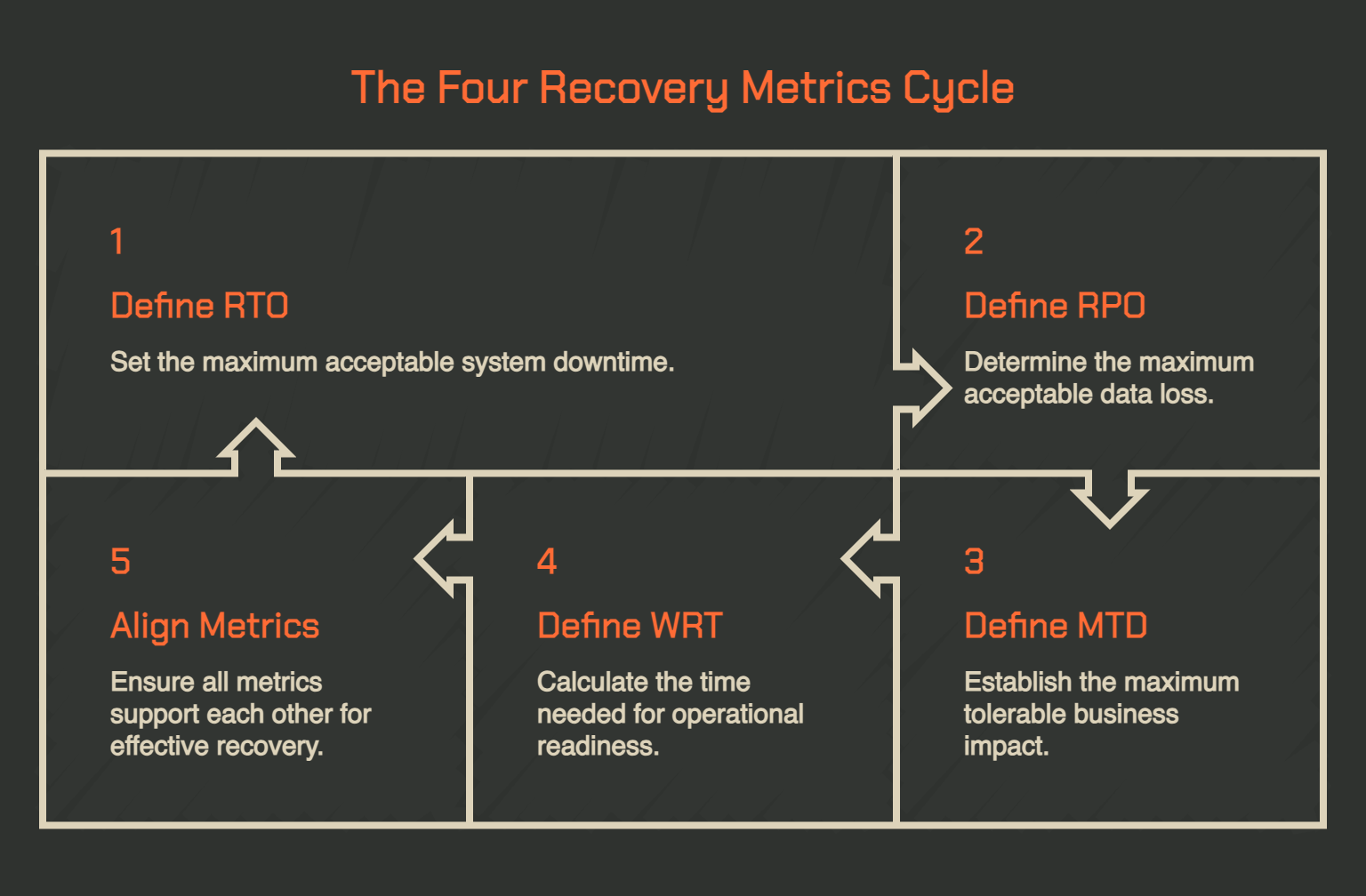
Most practitioners are familiar with RTO and RPO. Both are well-documented. NIST SP 800-34, the federal contingency planning guide, treats them as foundational inputs to any recovery strategy. The two metrics that get skipped far more often are MTD and WRT, and ignoring them is where recovery windows quietly fall apart.
- RTO (Recovery Time Objective): The maximum acceptable time your system can remain unavailable after a disruption. This is the clock your team is racing against once a failure is declared.
- RPO (Recovery Point Objective): The maximum acceptable data loss measured backward from the moment of failure. It determines how frequently you need to replicate or back up data to stay within tolerance.
- MTD (Maximum Tolerable Downtime): The total time a business process can be offline before the impact becomes unacceptable to the organisation. This is a business-defined ceiling, not a technical one.
- WRT (Work Recovery Time): The time needed to validate data integrity and confirm systems are actually ready to return to production after restoration. As the U.S. Centers for Medicare & Medicaid Services defines it: MTD = RTO + WRT.
For the last two factors, there is a relationship that people need to be aware of. If your RTO is four hours but your WRT requires six hours of data validation, your actual recovery window is ten hours, which may already exceed your MTD.
How to Build a Disaster Recovery Plan Step by Step
Writing a disaster recovery plan before you understand the business is like designing a building before knowing what load it needs to carry. The steps below are sequenced deliberately, and the sequencing matters as much as the steps themselves.
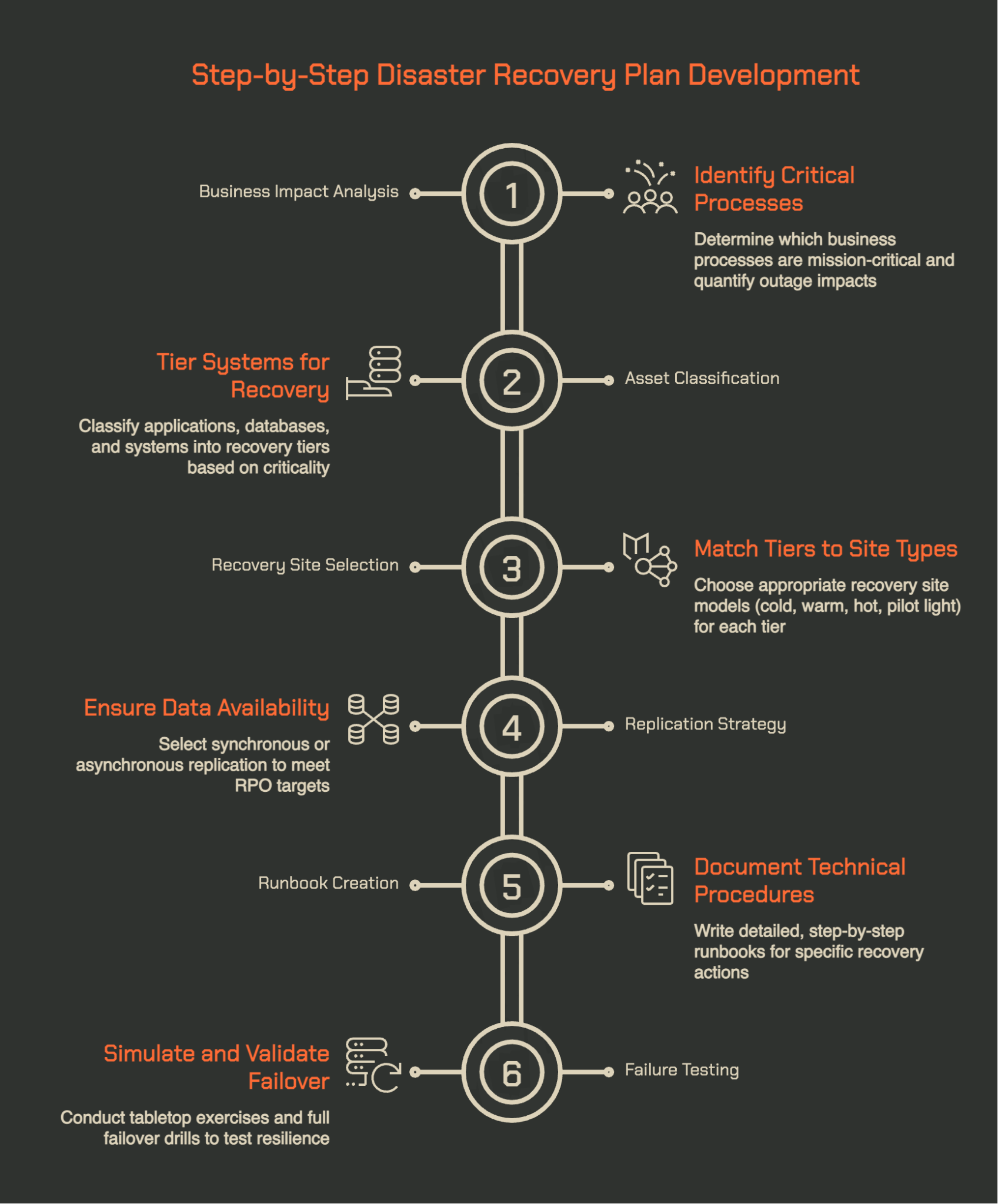
1. Start With a Business Impact Analysis, Not a Threat List
The instinct most teams follow is to start by cataloguing risks: ransomware, hardware failure, power outage, flood. That list is not useless, but it is not the right starting point. What you need to know first is what the organisation actually cannot afford to lose, and for how long, regardless of what caused the disruption.
A Business Impact Analysis (BIA) is how you can start that conversation.
It identifies which business processes are mission-critical, quantifies the financial and operational impact of outages at various durations, and produces the RTO, RPO, MTD, and WRT targets that will drive every architecture decision that follows.
Without a BIA, recovery objectives are practically guesses. Those guesses produce architectures that are either overbuilt for non-critical systems or dangerously underbuilt for the ones that actually matter.
The BIA should be a business-led exercise, not an IT-only one. The finance team, operations leadership, and compliance owners all need to weigh in on what "unacceptable downtime" means for their functions. The outputs of that conversation become the requirements your DRP is built to meet.
2. Classify Your Assets Into Recovery Tiers Before You Touch Architecture
Once the BIA is complete, you have enough information to classify every application, database, and system into recovery tiers.
This is the step most plans skip. They jump from BIA outputs directly to architecture decisions, which creates environments where every system is treated with roughly the same urgency, and the DR budget is spread too thin.
A practical tiering model works roughly as follows:
- Tier 1 (Mission-Critical): Revenue-generating or compliance-gated systems. RTO of minutes to two hours. Near-zero RPO. Examples include payment processing, core banking, patient record systems, and customer-facing SaaS platforms.
- Tier 2 (Business-Critical): Important operational systems where downtime causes material disruption but not immediate financial or regulatory consequences. RTO of four to 24 hours. Examples include ERP systems, internal collaboration platforms, and CRM.
- Tier 3 (Non-Critical): Systems that can tolerate extended downtime without cascading impact. RTO of 24 to 72 hours or more. Examples include reporting environments, development systems, and data archives.
These tiers can help filter every architecture and budget decision. Applying hot-site replication to a Tier 3 reporting system is a waste. Applying cold backup-only to a Tier 1 payment platform is a liability. Getting the classification right before touching architecture can help prevent both situations.
3. Match Each Tier to a Recovery Site Type (Cold, Warm, Hot, Pilot Light)
With tiers defined, you can now make informed architecture decisions. The four primary recovery site models each correspond to a different RTO/RPO range and cost profile. As research from Continuity Hub outlines, the choice should map directly to tier requirements, not to budget preference alone.
- Cold Sites: Cold sites have basic infrastructure (power, cooling, network) but no pre-loaded data or standing systems. Recovery takes days to weeks. Appropriate for Tier 3 systems where the business can tolerate an extended outage without catastrophic impact.
- Warm Sites: Warm sites have pre-provisioned hardware and receive scheduled data synchronisation, typically every four to 24 hours. Recovery takes hours. These cost 30 to 60 percent less than hot sites and are appropriate for Tier 2 systems. This is the sweet spot for most enterprise environments.
- Hot Sites: Hot sites maintain a fully synchronised, live duplicate of the production environment. Failover can occur in minutes. These are appropriate for Tier 1 systems and come at a significant cost premium, effectively doubling the infrastructure investment for every system protected.
- Pilot Light: Pilot light is a cloud-native variant where minimal services are always on, and the environment scales up during a DR event. It sits between warm and hot in terms of both cost and recovery speed, and is particularly well-suited to cloud workloads.
For organisations evaluating disaster recovery plans for cloud services, it is worth noting that cloud DR introduces a specific risk that on-premises models do not: provider concentration.
If your production environment and your DR environment both live in the same cloud provider, a provider-level incident, like the global CrowdStrike disruption in 2024, can disable both simultaneously. Multi-site or hybrid strategies that use a physical colocation facility as the recovery target for cloud-hosted workloads address this directly.
4. Pick a Replication Strategy That Can Deliver Your RPO
The recovery site type determines your infrastructure model. Your replication strategy determines whether your data is actually there when you need it. The two are separate decisions and both matter.
Synchronous replication writes data to both primary and secondary locations simultaneously before confirming a transaction is complete. This delivers near-zero RPO but introduces latency and requires high-bandwidth links between sites. It is appropriate for Tier 1 systems where even seconds of data loss carry financial or compliance consequences.
Asynchronous replication writes to the primary location first and synchronises to the secondary on a schedule or as bandwidth allows. This introduces a replication lag, which means your actual RPO in a failure scenario is the lag at the moment of failure, not the target lag. Monitoring replication health in real-time is not optional here.
If your RPO target is 15 minutes, you should be alerting when replication lag exceeds five minutes so you can investigate before a problem becomes a data loss event.
Snapshot-based backups are appropriate for Tier 3 workloads. They are not a replication strategy for anything with a tight RPO. The distinction between a backup and a replication strategy is important and frequently blurred in plans that were written quickly.
5. Write Runbooks, Not Just a Plan Document
A disaster recovery plan document typically contains high-level procedures, contact lists, system inventories, and recovery objectives. It is necessary, but it is not what your team will be operating from at 2 am during an active incident. That is what runbooks are for.
A runbook is a step-by-step technical procedure for a specific recovery action: promoting a database replica, updating DNS to point at a secondary site, validating application dependencies, confirming service health before returning traffic.
Each runbook should be written at a level of detail that allows someone unfamiliar with the environment to execute it correctly under pressure. Contact lists should be current. Credentials and access keys required for DR execution should be accessible independently of the primary environment because if the primary environment is down, so is everything stored only there.
The plan answers the question "what are we doing?" The runbooks answer "how, exactly, and in what order?" Both are required. A plan without runbooks is theory.
6. Test Failure, Not Just Recovery
The most common form of DR testing is verifying that backups complete successfully and that a restore works in a controlled environment. That is necessary but not sufficient.
What most plans do not test is the failure mode. Specifically:
- What happens when the failover itself encounters a problem?
- What happens when a dependency that was not mapped fails to come up in the right sequence?
- What happens when a runbook references a credential that has expired?
These gaps only surface under realistic conditions, and the only way to find them before an incident is to simulate one.
The testing spectrum runs from tabletop exercises (team walks through the plan verbally, no systems touched) to full failover drills where production traffic is actually cut over to the recovery environment.
The right frequency and depth depends on your tier structure. For example, Tier 1 systems warrant at least annual full failover testing, with more frequent component-level testing in between. ISO/IEC 27031, the international standard for IT readiness for business continuity, provides a recognised framework for structuring these exercises.
The output of every test should be a documented gap list with assigned owners and resolution timelines. A test that produces no findings is almost certainly not deep enough.
Why Qu Data Centres Supports Stronger DR Architectures Across Canada
Building a disaster recovery plan is one thing. Having the infrastructure to execute it is another. The most well-designed DR strategy is only as good as the facility anchoring it — and in Canada, the gap between what enterprises need and what most providers can actually deliver is significant.
Qu Data Centres operates nine purpose-built facilities across five Canadian markets: Calgary, Edmonton, Ottawa, Toronto, and London, Ontario. No other colocation operator covers all five.
That geographic reach matters directly for DR planning. This means that organisations can place their primary and recovery environments in separate Canadian markets with genuine geographic separation, meeting both data residency and physical distance requirements without routing data through foreign jurisdictions.
All facilities carry extensive independent certifications, including SOC 1, SOC 2, ISO 27001, and PCI DSS, and four are Uptime Institute Tier III certified. With 17 MW of capacity available today across the national footprint, Qu can support DR deployments from a single warm-site cabinet to multi-megawatt secondary environments.
The backup and disaster recovery solutions Qu provides also include managed DRaaS through Zerto, with continuous data protection, RPOs measured in seconds, and RTOs in minutes.
If your current DR architecture relies on a single site, a single cloud provider, or a facility that lacks the redundancy certifications your auditors require, we can help. Contact Qu Data Centres to book a tour today.
Frequently Asked Questions About Disaster Recovery Plans
What Does a Disaster Recovery Plan Look Like?
A complete DRP includes a scope statement, system inventory with criticality tiers, recovery objectives (RTO, RPO, MTD, WRT) per system, recovery site and replication architecture documentation, step-by-step runbooks for each recovery procedure, a contact and escalation list, and a testing schedule with documented results. The plan document is typically supported by separate runbooks that contain the executable procedures, which are kept current and accessible outside the primary environment.
How Is a Disaster Recovery Plan Different From a Business Continuity Plan?
A disaster recovery plan focuses specifically on restoring IT systems and data after a disruption. A business continuity plan covers how the organisation keeps functioning during that disruption — manual workarounds, alternate workflows, communications, and staff protocols. The two plans work together but address separate problems and are owned by different stakeholders. Having one does not replace the need for the other.
How Often Should You Test Your Disaster Recovery Plan?
Tier 1 mission-critical systems should undergo at minimum an annual full failover test, with component-level testing more frequently throughout the year. Tier 2 systems warrant at least annual tabletop exercises with periodic functional testing. The plan document itself should be reviewed any time a significant infrastructure change occurs, not just on an annual calendar cycle. Most organisations under-test; the right benchmark is that your last test should have found at least a few gaps worth fixing.
What Elements Should a Disaster Recovery Plan Cover?
A thorough DRP covers: defined recovery objectives (RTO, RPO, MTD, WRT) per workload; a tiered system classification; recovery site architecture and replication strategy; dependency maps for each application; step-by-step runbooks; roles and escalation paths; communication templates; testing procedures and frequency; and a maintenance schedule for keeping the plan current. The advantages of a disaster recovery plan built with all these elements include faster recovery, reduced data loss, and stronger compliance posture.
Why Are Detection Measures Included in a Disaster Recovery Plan?
Detection measures define how and when a disaster is formally declared, which triggers the recovery process. Without clear detection criteria, teams may spend critical early time debating whether an event rises to the level of invoking DR procedures. Thresholds for declaring a disaster, who has authority to declare it, and what the initial notification procedures are should all be defined in the plan so that the response begins at the right moment — not too early and not too late.
How Do You Write a Disaster Recovery Plan for Cloud Services?
Cloud DR planning follows the same BIA-driven, tiered approach as traditional environments, with additional considerations for the shared responsibility model and provider concentration risk. Each cloud workload should be classified into recovery tiers, replication should be configured to a physically separate and structurally independent recovery target, and the DR plan should account for the specific failover mechanics of the cloud platform in use. Organisations that keep all workloads within one cloud provider should model what a provider-wide disruption would do to both their production and recovery environments.
Sources Used for This Article
- NIST Computer Security Resource Center: "SP 800-34 Rev. 1, Contingency Planning Guide for Federal Information Systems" - csrc.nist.gov/pubs/sp/800/34/r1/upd1/final
- Centers for Medicare & Medicaid Services: "" - cms.gov/tra/Infrastructure_Services/IS_0410_DR_Capability_Considerations.htm
- ContinuityHub: "Disaster Recovery Site Selection: Hot, Warm, Cold & Cloud Architecture" - continuityhub.org/disaster-recovery-site-selection-hot-warm-cold-cloud-architecture/
- IBM: "The CrowdStrike outage: What you should know" - ibm.com/think/news/recent-crowdstrike-outage-what-you-should-know
- ISO: "ISO/IEC 27031:2011 - Information technology — Security techniques — Guidelines for information and communication technology readiness for business continuity" - iso.org/standard/44374.html






Quick Answer: A disaster recovery plan is a documented, tested set of procedures that defines how your organisation restores IT systems and data after a disruptive event. Building one that works requires more than documentation — it requires a structured BIA, tiered recovery architecture matched to real business tolerances, dependency mapping, and regular testing that goes beyond confirming backups exist.
Key Takeaways
Most organisations have something they call a disaster recovery plan. It lives in a shared drive, was written during an audit cycle, and references systems that have since been replaced. The IT team knows it exists. Nobody has tested it end-to-end. Then a ransomware event or a facility failure hits, and everyone finds out that the plan covers less than what they assumed initially
The problem is rarely a lack of intent. It is a lack of sequencing.
People write plans before they have defined recovery tolerances. They design architecture before they have classified workloads. They document procedures without testing them under realistic conditions. The result is a plan that looks complete on paper and fails quietly when it is needed most.
This article walks through how to build a disaster recovery plan the right way, starting with the decisions that should happen before a single line of documentation is written.
What a Disaster Recovery Plan Covers
A disaster recovery plan is specifically focused on restoring IT systems, data, and infrastructure after a disruptive event. It defines which systems get recovered, in what order, by whom, and within what timeframe.
DRP Vs. Business Continuity Plan
These two terms are frequently used interchangeably, but they address different problems. A business continuity plan (BCP) covers how the organisation keeps operating during a disruption.
Think manual workarounds, alternate workflows, communication protocols, and staff deployment. A disaster recovery plan covers how the IT infrastructure gets restored after the disruption is over or contained.
The difference matters because the two plans have different owners, different timelines, and different success criteria. A BCP might specify that your finance team processes payments manually for 48 hours while systems are offline. Your DRP defines how those systems come back online and in what sequence. Neither plan is a substitute for the other.
The Four Recovery Metrics You Need To Look At
Most practitioners are familiar with RTO and RPO. Both are well-documented. NIST SP 800-34, the federal contingency planning guide, treats them as foundational inputs to any recovery strategy. The two metrics that get skipped far more often are MTD and WRT, and ignoring them is where recovery windows quietly fall apart.
For the last two factors, there is a relationship that people need to be aware of. If your RTO is four hours but your WRT requires six hours of data validation, your actual recovery window is ten hours, which may already exceed your MTD.
How to Build a Disaster Recovery Plan Step by Step
Writing a disaster recovery plan before you understand the business is like designing a building before knowing what load it needs to carry. The steps below are sequenced deliberately, and the sequencing matters as much as the steps themselves.
1. Start With a Business Impact Analysis, Not a Threat List
The instinct most teams follow is to start by cataloguing risks: ransomware, hardware failure, power outage, flood. That list is not useless, but it is not the right starting point. What you need to know first is what the organisation actually cannot afford to lose, and for how long, regardless of what caused the disruption.
A Business Impact Analysis (BIA) is how you can start that conversation.
It identifies which business processes are mission-critical, quantifies the financial and operational impact of outages at various durations, and produces the RTO, RPO, MTD, and WRT targets that will drive every architecture decision that follows.
Without a BIA, recovery objectives are practically guesses. Those guesses produce architectures that are either overbuilt for non-critical systems or dangerously underbuilt for the ones that actually matter.
The BIA should be a business-led exercise, not an IT-only one. The finance team, operations leadership, and compliance owners all need to weigh in on what "unacceptable downtime" means for their functions. The outputs of that conversation become the requirements your DRP is built to meet.
2. Classify Your Assets Into Recovery Tiers Before You Touch Architecture
Once the BIA is complete, you have enough information to classify every application, database, and system into recovery tiers.
This is the step most plans skip. They jump from BIA outputs directly to architecture decisions, which creates environments where every system is treated with roughly the same urgency, and the DR budget is spread too thin.
A practical tiering model works roughly as follows:
These tiers can help filter every architecture and budget decision. Applying hot-site replication to a Tier 3 reporting system is a waste. Applying cold backup-only to a Tier 1 payment platform is a liability. Getting the classification right before touching architecture can help prevent both situations.
3. Match Each Tier to a Recovery Site Type (Cold, Warm, Hot, Pilot Light)
With tiers defined, you can now make informed architecture decisions. The four primary recovery site models each correspond to a different RTO/RPO range and cost profile. As research from Continuity Hub outlines, the choice should map directly to tier requirements, not to budget preference alone.
For organisations evaluating disaster recovery plans for cloud services, it is worth noting that cloud DR introduces a specific risk that on-premises models do not: provider concentration.
If your production environment and your DR environment both live in the same cloud provider, a provider-level incident, like the global CrowdStrike disruption in 2024, can disable both simultaneously. Multi-site or hybrid strategies that use a physical colocation facility as the recovery target for cloud-hosted workloads address this directly.
4. Pick a Replication Strategy That Can Deliver Your RPO
The recovery site type determines your infrastructure model. Your replication strategy determines whether your data is actually there when you need it. The two are separate decisions and both matter.
Synchronous replication writes data to both primary and secondary locations simultaneously before confirming a transaction is complete. This delivers near-zero RPO but introduces latency and requires high-bandwidth links between sites. It is appropriate for Tier 1 systems where even seconds of data loss carry financial or compliance consequences.
Asynchronous replication writes to the primary location first and synchronises to the secondary on a schedule or as bandwidth allows. This introduces a replication lag, which means your actual RPO in a failure scenario is the lag at the moment of failure, not the target lag. Monitoring replication health in real-time is not optional here.
If your RPO target is 15 minutes, you should be alerting when replication lag exceeds five minutes so you can investigate before a problem becomes a data loss event.
Snapshot-based backups are appropriate for Tier 3 workloads. They are not a replication strategy for anything with a tight RPO. The distinction between a backup and a replication strategy is important and frequently blurred in plans that were written quickly.
5. Write Runbooks, Not Just a Plan Document
A disaster recovery plan document typically contains high-level procedures, contact lists, system inventories, and recovery objectives. It is necessary, but it is not what your team will be operating from at 2 am during an active incident. That is what runbooks are for.
A runbook is a step-by-step technical procedure for a specific recovery action: promoting a database replica, updating DNS to point at a secondary site, validating application dependencies, confirming service health before returning traffic.
Each runbook should be written at a level of detail that allows someone unfamiliar with the environment to execute it correctly under pressure. Contact lists should be current. Credentials and access keys required for DR execution should be accessible independently of the primary environment because if the primary environment is down, so is everything stored only there.
The plan answers the question "what are we doing?" The runbooks answer "how, exactly, and in what order?" Both are required. A plan without runbooks is theory.
6. Test Failure, Not Just Recovery
The most common form of DR testing is verifying that backups complete successfully and that a restore works in a controlled environment. That is necessary but not sufficient.
What most plans do not test is the failure mode. Specifically:
These gaps only surface under realistic conditions, and the only way to find them before an incident is to simulate one.
The testing spectrum runs from tabletop exercises (team walks through the plan verbally, no systems touched) to full failover drills where production traffic is actually cut over to the recovery environment.
The right frequency and depth depends on your tier structure. For example, Tier 1 systems warrant at least annual full failover testing, with more frequent component-level testing in between. ISO/IEC 27031, the international standard for IT readiness for business continuity, provides a recognised framework for structuring these exercises.
The output of every test should be a documented gap list with assigned owners and resolution timelines. A test that produces no findings is almost certainly not deep enough.
Why Qu Data Centres Supports Stronger DR Architectures Across Canada
Building a disaster recovery plan is one thing. Having the infrastructure to execute it is another. The most well-designed DR strategy is only as good as the facility anchoring it — and in Canada, the gap between what enterprises need and what most providers can actually deliver is significant.
Qu Data Centres operates nine purpose-built facilities across five Canadian markets: Calgary, Edmonton, Ottawa, Toronto, and London, Ontario. No other colocation operator covers all five.
That geographic reach matters directly for DR planning. This means that organisations can place their primary and recovery environments in separate Canadian markets with genuine geographic separation, meeting both data residency and physical distance requirements without routing data through foreign jurisdictions.
All facilities carry extensive independent certifications, including SOC 1, SOC 2, ISO 27001, and PCI DSS, and four are Uptime Institute Tier III certified. With 17 MW of capacity available today across the national footprint, Qu can support DR deployments from a single warm-site cabinet to multi-megawatt secondary environments.
The backup and disaster recovery solutions Qu provides also include managed DRaaS through Zerto, with continuous data protection, RPOs measured in seconds, and RTOs in minutes.
If your current DR architecture relies on a single site, a single cloud provider, or a facility that lacks the redundancy certifications your auditors require, we can help. Contact Qu Data Centres to book a tour today.
Frequently Asked Questions About Disaster Recovery Plans
What Does a Disaster Recovery Plan Look Like?
A complete DRP includes a scope statement, system inventory with criticality tiers, recovery objectives (RTO, RPO, MTD, WRT) per system, recovery site and replication architecture documentation, step-by-step runbooks for each recovery procedure, a contact and escalation list, and a testing schedule with documented results. The plan document is typically supported by separate runbooks that contain the executable procedures, which are kept current and accessible outside the primary environment.
How Is a Disaster Recovery Plan Different From a Business Continuity Plan?
A disaster recovery plan focuses specifically on restoring IT systems and data after a disruption. A business continuity plan covers how the organisation keeps functioning during that disruption — manual workarounds, alternate workflows, communications, and staff protocols. The two plans work together but address separate problems and are owned by different stakeholders. Having one does not replace the need for the other.
How Often Should You Test Your Disaster Recovery Plan?
Tier 1 mission-critical systems should undergo at minimum an annual full failover test, with component-level testing more frequently throughout the year. Tier 2 systems warrant at least annual tabletop exercises with periodic functional testing. The plan document itself should be reviewed any time a significant infrastructure change occurs, not just on an annual calendar cycle. Most organisations under-test; the right benchmark is that your last test should have found at least a few gaps worth fixing.
What Elements Should a Disaster Recovery Plan Cover?
A thorough DRP covers: defined recovery objectives (RTO, RPO, MTD, WRT) per workload; a tiered system classification; recovery site architecture and replication strategy; dependency maps for each application; step-by-step runbooks; roles and escalation paths; communication templates; testing procedures and frequency; and a maintenance schedule for keeping the plan current. The advantages of a disaster recovery plan built with all these elements include faster recovery, reduced data loss, and stronger compliance posture.
Why Are Detection Measures Included in a Disaster Recovery Plan?
Detection measures define how and when a disaster is formally declared, which triggers the recovery process. Without clear detection criteria, teams may spend critical early time debating whether an event rises to the level of invoking DR procedures. Thresholds for declaring a disaster, who has authority to declare it, and what the initial notification procedures are should all be defined in the plan so that the response begins at the right moment — not too early and not too late.
How Do You Write a Disaster Recovery Plan for Cloud Services?
Cloud DR planning follows the same BIA-driven, tiered approach as traditional environments, with additional considerations for the shared responsibility model and provider concentration risk. Each cloud workload should be classified into recovery tiers, replication should be configured to a physically separate and structurally independent recovery target, and the DR plan should account for the specific failover mechanics of the cloud platform in use. Organisations that keep all workloads within one cloud provider should model what a provider-wide disruption would do to both their production and recovery environments.
Sources Used for This Article
Paul M
Paul Miedzik is Senior Manager of Marketing at Qu Data Centres, with extensive experience in enterprise cloud and digital infrastructure across the Canadian tech sector.